Create a new profile to help Troubleshoot

(authored by @sampson)

For those impacted by performance and/or memory issues, here are a couple steps to take which will help us in helping you.

As many here have stated, it’s good to disable extensions. Extensions are third-party applications; it’s entirely possible an extension could eat up tons of memory. By removing them from the equation, we greatly simplify the task of identifying the problem itself.

Create a Testing Profile

Testing with a private window is good, but this usually leaves a normal window in the background (where performance issues could still occur). Using a fresh profile is a much better approach. To do this, select ☰ --› More tools --> Add new profile.

Your new profile will launch immediately. If you haven’t had a second profile up to this point, you will now notice a small circle image at the top-right of Brave. If you have had a second profile prior to this point, you’ll note a new, distinct image at the top-right:

This profile is fresh, meaning it shouldn’t have any extensions installed or browsing history (:warning: check brave://extensions to make sure none have been side-loaded by other software on your computer).

Monitoring Memory and Performance

Users tend to share screenshots of memory-management tools beyond the browser, such as Task Manager. This doesn’t help much, since it doesn’t identify which processes within the browser (be they tabs, frames, extensions, service workers, etc.) are using the resources.

Brave comes with a built-in Task Manager. You can find it in ☰ --› More Tools --› Task Manager. Unlike Windows’ Task Manager, Brave’s built-in option tells you how much CPU/GPU, memory and more are tied to specific browser tabs and extensions.

Right-clicking on any column header will reveal additional types of data you can review; turn on as much as you like, or as little. Memory, Cache, CPU, and GPU are among the most helpful.

Less is More

Now that we have a new profile (make sure that the original profile is closed closed), and a way to monitor memory and performance, we can start testing. We don’t know what this point which sites are causing the most drain, or if it’s something in Brave itself. So it’s best to start simple. Visit only a couple sites, and keep an eye on that memory usage (you can click the headers to sort the process list into ascending or descending order; great way to keep the biggest memory-hogs on top).

If typical browsing activities on one site doesn’t impact memory and/or performance, open a new tab and begin testing another site. Brave’s Task Manager will continue to report memory and performance metrics for specific tabs.

If you are unable to reproduce the issue by browsing to the sites you typically visit, you can proceed to install an extension you commonly use. In similar fashion to testing pages, let’s start with only a single extension. Install (and complete any necessary setup afterwards), and keep an eye on that task manager for sudden spikes in usage.

Reporting an Issue

Think you might have found an issue? We’d love to know! Metrics from Task Manager are incredibly helpful, especially since they explicitly identify the process to which they are associated. You might just find that Brave starts to crawl after a few minutes on a popular site, or moments after installing a commonly-used extension. With that information, our team will be better equipped to move more promptly towards improving your experience.

Deleting a Testing Profile

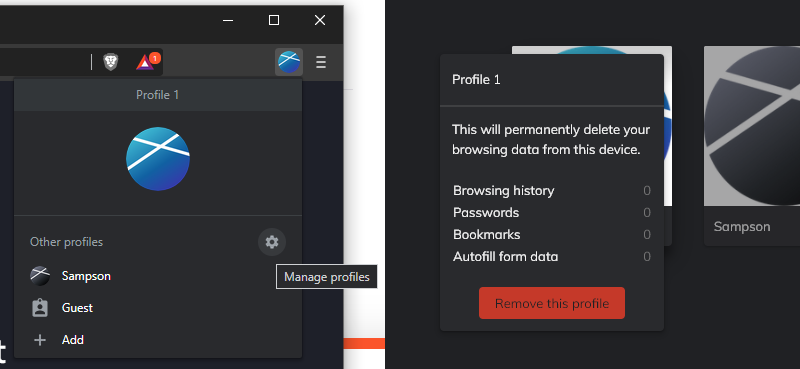
When you’re ready to delete your testing profile, click the image at the top-right of Brave and select the :gear: icon to open up the Manage Profiles view. Hover over the testing profile to reveal a ⋮ in the top-right corner—clicking that will give you the option to remove the testing profile (Note, double-check the metrics to make sure this is the profile you wish to delete).
8 Likes
Ridiculous memory usage and "out of memory" errors when using Facebook
Where are my passwords!
No ads since 3 months!
Doesn't receive brave ads
Autoplay Media Popup Showing Regardless of Content of Page
Maybe the worst bug ive ever seen on Brave
Google Docs will not load
Just logged into windows and brave deleted all cookies and broken icon
Paypal.com Issue - Currency menu ellipses do not expand
"Always translate" option in translator missing
All Google apps are unusable
{ status access violation}
Freezing between 2 to 12 sec
Brave 1.27.109 crashes on MacOS Big Sur 11.5 upon closing a window
Product image not showing in brave browser
Outlook still not working on Brave
UniCredit Social Login Bug
Brave ads not showing...ever
Page scroll doesn't work
Seeing adverts, not getting BATs
Cannot edit stored web page passwords, "Edit" is missing from the "3" dot menu
Dropdowns and Blocked Pages
Can't sign in to Google Keep Extension
Widevine Content Decryption Module - Cant update
Suddenly stopped earning brave
I have an issue regarding ads
Not earning BAT Rewards since 1st of March
No ads, no payment... after last update on mac and android
Brave rewards does not work and counting my bats
Did not receive payouts for January
Google Signin Not working on Brave
SearchBaron and Bing/Ask search engine
Extension is greyed out
Gmail, Whatsapp web, Youtube
Gmail as of Aug 13 will not open in Standard mode, it forces HTML mode only on Brave Browser, please help!
Idk if it's a bug. Please read and help me
Bug? Unable to Download/Save Anything. Browser Freezes
Brave Desktop search cancelling
A new Tab opens for no reason with an specific web page
Brave is hacked. Google Image auto switched to Microsoft Bing already 2 weeks. Today 2021-05-24 is worse, come out "Microsoft we are updating our Term"
The cursor turns white - malware?
Brave Blocks YouTube Thumbnails
YouTube no longer working?
Print dialog not showing my installed printer in Windows 10
YouTube videos will not play. Stuck on Pause
Print dialog not showing my installed printer in Windows 10
Settings for some websites not saving with this version of Brave
ERR_TUNNEL_CONNECTION_FAILED for Bank of America
Why i am not getting / receiving any ads from brave?
Fonts appearing weirdly (hard to read) and unable to change it
Google images not loading properly
Google Meet not working properly after upgrading to BigSur
Google news issue
Spellcheck problem
Some websites loading incorrectly
Small font in Google search results
Search by google in brave
Twitter and twitch not working
Desktop Website Shortcuts
New tabs are really slow at opening (up to 15 sec)
Malicious annoying exrension
Brave is totally and completely DOA
Window is not maximized when coming out of fullscreen
Logged out from gmail, protonmail and all logged in webs, saved password gone
Youtube tumbnails dont appear when shield is up
Thumbnail of YouTube videos
Brave Browser suddenly very slow
All My webpages are in dark mode
From no advertisements to advertisements everywhere with no changes made to settings
Captcha Verification After every Google Search
Small Browser window keeps popping up
Wikipedia Not Showing Images!
Diffrent tab opening instead of new tab
Back button goes home instead on YouTube
Fonts and video playback acting weird
Brave Browser Page Cannot Be Resized
Video playback freezes
Back button not working properly anymore
Page Unresponsive issue on Win10
Can't use mouse wheel to scroll
Brave browser hanging/freezing since last update
Brave not updating Plex metadata
Brave browser freezes on image paste
Red highlighting
Cant delete profiles
Browser not responding
Bugs on Ubuntu 21.10: Slow browser (solved) + can't upload files
Can't change default download folder from /run/user on Linux
I need help with my browser and search function
Tabs getting disconnected from main window
Brave freezes on Upload/Add attachment button
Attach file size zero
URL's won't open sometimes, need to try again
Error de privacidad
Brave freezes my laptop when i close the window
Not seeing embedded tweets in Brave for MacOS
History missing. Top sites don't show. Rewards don't show
Brave opening a single webpage repeatedly when opening any tab or link: wenloogo.icu
Things can't be clicked Brave but can in Chrome
Roundcube not sending email with brave browser
Brave Browser will not access certain websites when logged in as certain user
Brave Desktop freezes and ramps up CPU to 100% on some sites
Problem when playing videos
Google accounts signs out of Brave PC after closing the Browser
Images in Brave all look like negatives and black background
White Shading around pictures and videos
Google accounts signs out of Brave PC after closing the Browser
No images are loading on any website
Certificate/https error while visititng sites
Brave not connecting to the internet when the system proxy is off
Brave crashes - no logs - Windows 10 Events log only
Google pages unresponsive in Brave
Brave crashes - no logs - Windows 10 Events log only
Brave rewards to my uphold
A little help here Please
Brave Isn't Loading Text On Any Webpages or In Its Configuration Menus At All After I Had To Force Shutdown My PC
Cannot verify wallet, only offered bitflyer as an option
Error 400 on Google Calendar (Gmail seems fine)
Brave stops working for a few seconds
The Disappearing Bookmark Trick
Brave Freezes [Debian] since 1.37.111
Browser Has Been Lagging For a Few Weeks
More often than not, when I click a link in Brave Browser, it opens a blank window on top of the main window
Brave search engine stuck on microsoft bing
Text files and pdfs are not downloading properly
Download windows won't show up
Brave browser does not save its own bookmarks
Gmail Error when logging in via Brave
Gemini not supported- USA user
Brave wallet freeze the browser and the whole computer
Brave Browser miss authorize to bank site
Horizontal tabs
Is anyone on Ubuntu getting brave ads?
Brave browser hangs while loading different sites
Twitter is broken in Brave please help me fix it
Is It Possible And Okay To Install Brave In Two Different Paths On Your Computer?
Frustrated with Brave over no responses
Need separate Brave Shield settings for incognito
All my websites have high contrast, e.g., white and black; how do I change that?
Youtube videos automatically playing in background
Google authentication always fails: "Couldn't sign you in. This browser or app may not be secure..."
Youtube has a lot of lag
Paypal.com Issue - Currency menu ellipses do not expand
Suggestions for using Brave for online banking?
Youtube videos automatically playing in background
Can't log into Twitch
Download error for no reason, I can´t download anything
Backspace use on facebook scrolls the page
"Continue where you left off" startup option is not working
Erreur au niveau de profil
Pages unrepsonsive message
Cannot scroll on many site forums
Brave 1.46 extensions get access denied
How to see Brave's 'Task Manager' on a Mac?
NET::ERR_CERT_INVALID on all websites
Can't sign into my Poshmark Store on PC anymore
Hosts file localhost loopback failure for 127.0.0.1 twitter.com
Tubi streaming -occasional freezing/halting
Twitter Redirect All Links
Bitwarden login doesn't work
Walmart.com redirects to account sign-in screen (Brave Linux and Mac, Not FF or Safari)
When I quit Brave, unknown Hidden Window kills all tabs
Brave confused about account when logging in to Gmail
Trouble logging into HRBlock.com
Can't sign into Yahoo via Brave
YouTube does not work when blocking Trackers and Ads is ON
Brave deleted all my active tabs and favorites
Loading proton mail and pass app very slow or not working at all