Description of the issue:
This only started happening recently, so I think it came with a new update.
Steps to Reproduce:
Open Brave
Click on the “Tab Search” button at the top
Browser crashes instantly
Expected result:
Actual result:
Additional question:
Brave Version:
Operating System:
289wk
April 13, 2026, 6:45am
2
@Infinit88y
NOTE: In a Brave Browser New Window, go to: brave://settings/privacy and ENABLE Automatically send diagnostic reports
READ the guidance:
https://support.brave.com/hc/en-us/articles/22281484910221-How-do-I-manually-submit-crash-reports
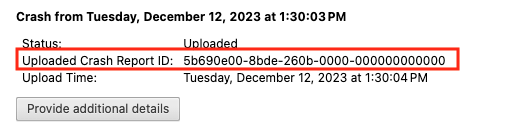
After you click the “Send Now” button, return to brave://crashes and gather up the Crash Report ID numbers that end with a string of zeros. Post the numbers, here, in a new reply. Example of a Crash Report ID number:
Status:
Hochgeladen
ID für hochgeladenen Absturzbericht:
438f0600-fca6-8c0f-0000-000000000000
Upload-Zeitpunkt:
Montag, 13. April 2026 um 21:38:20
Is there no way to simply remove the button? It’s just in the way there anyway since I don’t need it. Thanks!
This is a known issue that the team has already submitted a fix for:
opened 07:18PM - 09 Apr 26 UTC
closed 06:35PM - 13 Apr 26 UTC
bug
closed/duplicate
crash
OS/Desktop
### Description
<img width="679" height="296" alt="Image" src="https://github.c… om/user-attachments/assets/dc1a4851-e7c5-487d-bb6c-c0217d52feb3" />
- The chevron next to the minimize button in the screenshot should not be appearing, the updated UI should not include it. Several users are reporting that it is in the UI, and when clicking on it it is causing the browser to crash. Team is investigating how these users have it enabled.
- No flags enabled (reported)
- Uploaded Crash Report IDs:
- 66320100-fca6-8c0f-0000-000000000000
- 343d0100-fca6-8c0f-0000-000000000000
- cd400100-fca6-8c0f-0000-000000000000
- Reports on 1.89.132 and Beta 1.90.101
Backtrace callstack:
```
[ 00 ] std::__Cr::__atomic_base<int,1>::fetch_add
[ 01 ] base::AtomicRefCount::Increment
[ 02 ] base::subtle::RefCountedThreadSafeBase::AddRefImpl
[ 03 ] base::subtle::RefCountedThreadSafeBase::AddRef
[ 04 ] base::RefCountedThreadSafe<base::internal::WeakReference::Flag,base::DefaultRefCountedThreadSafeTraits<base::internal::WeakReference::Flag> >::AddRefImpl
[ 05 ] base::RefCountedThreadSafe<base::internal::WeakReference::Flag,base::DefaultRefCountedThreadSafeTraits<base::internal::WeakReference::Flag> >::AddRef
[ 06 ] scoped_refptr<const base::internal::WeakReference::Flag>::AddRef
[ 07 ] scoped_refptr<const base::internal::WeakReference::Flag>::scoped_refptr
[ 08 ] base::internal::WeakReference::WeakReference
[ 09 ] base::internal::WeakReferenceOwner::GetRef
[ 10 ] base::WeakPtrFactory<views::MenuButtonController>::GetWeakPtr
[ 11 ] views::MenuButtonController::Activate
[ 12 ] views::ButtonController::OnMouseReleased
[ 13 ] ui::ScopedTargetHandler::OnEvent
[ 14 ] views::internal::RootView::OnMouseReleased
[ 15 ] views::Widget::OnMouseEvent
[ 16 ] ui::EventDispatcher::DispatchEvent
[ 17 ] ui::EventDispatcherDelegate::DispatchEventToTarget
[ 18 ] ui::EventDispatcherDelegate::DispatchEvent
[ 19 ] ui::EventProcessor::OnEventFromSource
[ 20 ] ui::EventSource::DeliverEventToSink
[ 21 ] ui::EventSource::SendEventToSinkFromRewriter
[ 22 ] ui::EventSource::SendEventToSink
[ 23 ] views::DesktopWindowTreeHostWin::HandleMouseEvent
[ 24 ] views::HWNDMessageHandler::HandleMouseEventInternal
[ 25 ] views::HWNDMessageHandler::OnMouseRange
[ 26 ] views::HWNDMessageHandler::_ProcessWindowMessage
[ 27 ] views::HWNDMessageHandler::OnWndProc
[ 28 ] gfx::WindowImpl::WndProc
[ 29 ] base::win::WrappedWindowProc<&gfx::WindowImpl::WndProc>
```
### Steps to reproduce
1. Click on Search Tabs Button
2. Brave Crashes
### Actual result
Brave Crashes
### Expected result
chevron should not be appearing next to the minimize button
### Reproduces how often
Easily reproduced
### Brave version (brave://version info)
- Reports on 1.89.132 and Beta 1.90.101
### Channel information
- [x] release (stable)
- [x] beta
- [ ] nightly
### Reproducibility
- [ ] with Brave Shields disabled
- [ ] with Brave Rewards disabled
- [ ] in the latest version of Chrome
### Miscellaneous information
https://www.reddit.com/r/brave_browser/comments/1sgxhpz/new_search_tabs_button_crashes_the_browser_100_of/
Issue should be resolved in the next 1.89x update.