@gfmoore so I just tried testing and can’t replicate on Windows. So not sure if it’s a Linux specific problem or something within your setup.
If you can be patient with me here a bit and confirm the process, it may help.
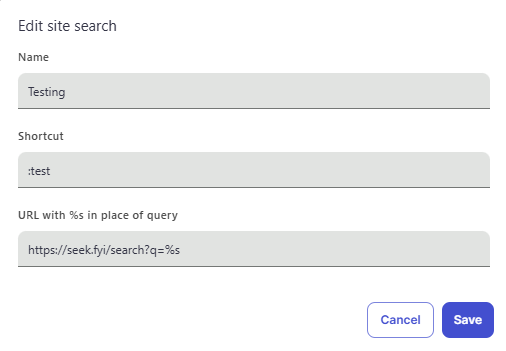
You’re going to Brave’s settings and to manage search engines. You’re creating a site search and filling in with whatever you’re wanting to call it and your shortcut. But overall, kind of is like below:
The URL is, as you mentioned, https://seek.fyi/search?q=%s No spaces or anything before/after, no " or anything, etc?
It works wonderfully until you reboot your system? So exiting Brave doesn’t matter, but it’s only when you reboot?
And you’re saying it just deletes part of the https://seek.fyi/search?q=%s, that the whole URL vanishes, or that the site search thing is no longer there?
Have you noticed if this happens to anything else or if it is occurring this engine only?
I’ve just noticed that if I exit Brave completely (shut down all instances) it also loses the settings I made. (Normally I always have a Brave instance open for YouTube in a separate window)
The way I am trying to use it is if on a new tab I type my phrase it should use the searxNG search engine directly and display the results. Which it does. But on reboot or (now) close down Brave it is losing the setting that I have typed in and saved. I’m assuming that I am using this feature the right way!
@gfmoore if you try in a new browser profile, does it happen there as well? To be clear, I’m asking you to go to the hamburger menu → More Tools → Add new profile to create a second profile and then try to set the search engine there. Then I guess to see if it disappears there as well.
And @Mattches you have any other ideas what might be happening?
Not sure why this is happening. I would also be interested in knowing if the issue occurs in a fresh profile as well.
For me, I just tested on my Ubuntu VM and don’t see this issue. That said, I setup the search by doing the following:
Went to brave://settings/search and made sure that Index other Search engines was toggled “on”
Visited https://seek.fyi/ and performed a search on the site
Refreshed the brave://settings/search page, then Manage search engines
Here, at the bottom of the page under Inactive sites, https://seek.fyi/search?q=%s was listed – I clicked Activate
Then clicked the “more options” (three dots icon) icon next to the entry, then Make default
After doing this, my default search engine was seek.fyi and searching from the address bar shows me the results for that site. I then fully closed the browser, relaunched it and tested again.
The search settings remained unchanged as did the default search.
I tried using the guest profile, but that didn’t stick after a reboot. I’ve tried changing the name I’ve given the search to a unique name so that sync can’t affect it. It looks ok, but not yet convinced. Will have a look tomorrow. Are the settings stored somewhere?
If you have the problem of the search not being setup on the loaded profile then this suggests the sync for the account is something to do with the issue.
Also FYI if you want to it is possible to setup your own personal SearxNG instance.
Okay I tried that (for others you might need to get “screen” sudo apt install screen)
I did that and it failed to retain the search engine I created.
I went to check the sync settings and I discovered I wasn’t actually synced!! The upgrade to Ubuntu 25.04 didn’t keep the settings. Although all my sync’d bookmarks were retained.
I also noted that other windows of Brave instances I thought I closed would also appear when I started Brave. I think? I’ve now cleared that “cache?” by re-closing all tabs and then the browser window.
I’m not really certain what state my Brave installation is in. I’m going to try and remove it and start again. (Must save my bookmarks!!!
If you would provide the string you are adding for search. I would be able to try adding it into mine and then see if it sticks across a quit and reload.
For me this is the result (running mint) … everything up to date.
Brave Browser 138.1.80.115
If you have a different version then maybe updating Brave will fix the problem. If you are running that version an uninstall and reinstall of the Brave browser may help?
Are you setting seek as the default search engine and are you doing something similar to the following instructions?
The good news is the string you are putting in seems to be valid and Brave seems to use it when it is set as the default.
Thanks for the heads up. Yes, thats the version. I think sync and having multiple pages open caused some weirdness, but it all seems settled now. Tomorrow, if I get time, ill reset all my devices and resync.



 →
→