I used Perplexity.ai in order to get an explanation re where Brave Browser stores Tabs data:
Brave stores your open tabs as part of its browser profile data on disk, in much the same way that Chrome does, using session and history files inside your user profile folder.
These files keep track of which URLs are open in which windows, plus metadata like tab order and navigation history, so Brave can restore them when you reopen the browser or use “continue where you left off”.
Where tabs are stored
On desktop, Brave’s per-user data lives under a Brave profile folder (for example, on Windows under BraveSoftware\Brave-Browser\User Data\), and each profile (Default, Profile 2, etc.) has a Sessions directory.
[MacOS: /Users/username/Library/Application Support/BraveSoftware/Brave-Browser/Default/]
The Sessionsdirectory contains binary session files that record your current and recent tab state, and copying these files elsewhere effectively backs up the set of open tabs for that profile.
How session restore works
When you enable “Continue where you left off” in Settings → Get started, Brave reads those session files on startup and reopens the tabs and windows that were active when the browser was last closed.
If that option is disabled, Brave may still maintain recent closed-tab information in its session data, which is why keyboard shortcuts like Ctrl+Shift+T can reopen closed tabs and even whole closed windows from that stored session history.
Saving and backing up tab sets
If you want an explicit, named snapshot of your tabs rather than relying on automatic session files, Brave lets you “Bookmark all tabs,” which creates a folder of bookmarks representing every open tab in that window.
For more manual backups, some users periodically copy the Sessions files from the profile folder into dated backup folders; restoring them later and reopening Brave brings back the exact tab set from that time.
How do I manually submit crash reports?
https://support.brave.com/hc/en-us/articles/22281484910221-How-do-I-manually-submit-crash-reports
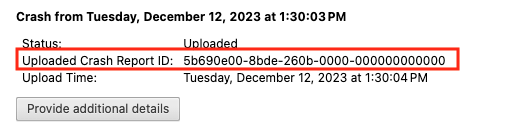
After you click the “Send Now” button, return to brave://crashes and gather up the Crash Report ID numbers that end with a string of zeros. Post the numbers, here, in a new reply. Example of a Crash Report ID number: