Every time brave crashes, the restore feature doesn’t work

Troubleshooting technical issues is much easier when both the user and support agent practice clear communication. For this reason, we have provided the template below for you to fill out with information about your issue. Please provide as much detail as possible so we can most efficiently resolve your problem.

Delete the any text above the line separator below before posting


Description of the issue:
How can this issue be reproduced?

Expected result:

Brave Version( check About Brave):

Additional Information: Every time and this has happened to me 7 or 8 times now, brave crashes I click restore tabs and nothing happens, that’s it. Not one page is restored, I’ve to manually scroll through pages and pages of history and go through every single site, which of course is great fun when there’s loads of similarly named pages. Why is it every other browser has this and its functional but brave doesn’t? Other browsers have it in their history tab too but on brave it’s only there after the crash, so you better not miss it, but of course it doesn’t work. I’d be less pissed off if the restore button wasn’t there but putting it there and it doing nothing is infuriating.
@WTF111

I used Perplexity.ai in order to get an explanation re where Brave Browser stores Tabs data:


Brave stores your open tabs as part of its browser profile data on disk, in much the same way that Chrome does, using session and history files inside your user profile folder.

These files keep track of which URLs are open in which windows, plus metadata like tab order and navigation history, so Brave can restore them when you reopen the browser or use “continue where you left off”.​

Where tabs are stored

On desktop, Brave’s per-user data lives under a Brave profile folder (for example, on Windows under BraveSoftware\Brave-Browser\User Data\), and each profile (Default, Profile 2, etc.) has a Sessions directory.

[MacOS: /Users/username/Library/Application Support/BraveSoftware/Brave-Browser/Default/]

The Sessionsdirectory contains binary session files that record your current and recent tab state, and copying these files elsewhere effectively backs up the set of open tabs for that profile.​

How session restore works

When you enable “Continue where you left off” in Settings → Get started, Brave reads those session files on startup and reopens the tabs and windows that were active when the browser was last closed.

If that option is disabled, Brave may still maintain recent closed-tab information in its session data, which is why keyboard shortcuts like Ctrl+Shift+T can reopen closed tabs and even whole closed windows from that stored session history.​

Saving and backing up tab sets

If you want an explicit, named snapshot of your tabs rather than relying on automatic session files, Brave lets you “Bookmark all tabs,” which creates a folder of bookmarks representing every open tab in that window.

For more manual backups, some users periodically copy the Sessions files from the profile folder into dated backup folders; restoring them later and reopening Brave brings back the exact tab set from that time.


How do I manually submit crash reports?

https://support.brave.com/hc/en-us/articles/22281484910221-How-do-I-manually-submit-crash-reports

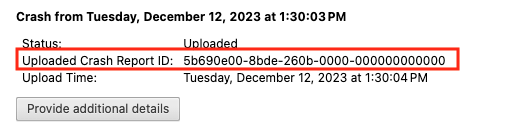
After you click the “Send Now” button, return to brave://crashes and gather up the Crash Report ID numbers that end with a string of zeros. Post the numbers, here, in a new reply. Example of a Crash Report ID number:

Brave does have this feature. Although I’m not clear as to why the restore tabs prompt isn’t working (we’ll get to that in a moment), they also show up in History in the main menu and will display there whether the browser crashed or if you simply closed (via red x button) a window with open tabs in it.

For example, here I have three tabs open:

If I click the red x to close the window, then re-open the browser and view History in the main menu, I see an entry for three tabs listed:

Hovering on that entry, I see the option to restore that window and it’s related tabs:

Do you not see these entries listed here? Can you test this by opening some tabs, clicking the x (notably not “quitting” the application process), then reopening the browser and checking History in the main menu?

Hi,

Thanks for replying, that works when you close the tabs or close and relaunch the program but I’m talking about when brave crashes, when I open history none of the tabs to restore are there, it’s just blank, like a new session. Even the full history doesn’t have things in the right order so I can’t even work backwards. For example today I had a video playing in the background, I was working on another program, brave crashes and the vid, I had playing was buried, 30th on the list, some that I had opened in use and that had been closed, but I hadn’t been through 30 tabs since.

Interesting, so it’s not remembering the session at all, history is blank.

Ok so here’s a secret Chromium command not many use, and it’s only for debugging purposes. Open a few tabs in your browser to setup a “staged session” and we are going to then open a new tab, and enter: about:inducebrowsercrashforrealz

Exactly as is. I know it sounds like a not real command, but this is a Chromium command to simulate a hard crash, so any Brave window open will be closed when you run this. What I want to see is, when you launch Brave again, it should ask to Restore the session. Does it now restore? Or does it again forget? (This helps pinpoint perhaps if this specific crash is preventing the restoration or if it’s any kind of crash in general.)

Hi,

Wow, Thanks for doing that, I have a Mac so I tried following through the folders, but once I get to “application support”, there’s no bravesoftware or brave browser anywhere to be found, I looked through them and did a search but there’s nothing. I’m sure the raw data is somewhere but I can’t find it.

Thanks for the help though

ahh crap I’m not replying to these in the correct order, this message was for the first response

No worries, I see it via:
image
on your reply.

That tells us who you are replying to.

Though, @Mattches , can you confirm though there should actually be a Brave Software directly under ~/Library/Application Support/BraveSoftware? If so however, we might have just found the problem, and if that’s the case, I bet my URL that induces a hard crash will fail and not restore the session.

Hi thanks for this,

So I did that crash and it was able to restore the tabs properly this time. But when it happens organically it never works, it crashes every couple of months and it hasn’t work the last 7 or 8 times. One time I had an old external monitor that would sometimes switch off and it somehow triggered the browser to crash, even though all the other programs were running fine like I just disconnected the monitor without issue.

Oh wow, interesting. Ok so that’s good. That means this specific crash is actually causing the lack of restoration, this can help narrow down possible causes.

I’m not entirely sure why BraveSoftware wasn’t where it was expected to be (per the AI they used), unless that just wasn’t right, but I’ll assume it’s present, because the session restored, and that is where it stores this as far as I know.

Do you have any extensions installed in Brave that you remember installing? They can be found here: brave://extensions/

@MasterLink I haven’t any extensions that I manually installed but “google docs offline” and “google translate” are the only two.

I’m not entirely sure if either of those two would cause such a crash that causes loss of sessions. Since the secret hard crash command does allow restoration, we can’t test-disable either of them to even try (so that is the other side of the coin, being that command did allow restoration).

I’ll let @Mattches take it from here. This could be a variety of issues, and while I used to work at Apple, I didn’t develop Brave. :sweat_smile: (Not to mention it’s been since Mac OS Mavericks that I both worked at, and used an Apple product.)

Ohh man mavericks those were the days, I still have a 2008 MacBook Pro, I use it for playing music and bootcamp to run windows XP so I can play my old games. I don’t think I’ll ever tire of Star Trek armada 2, the og counter strike or alien vs predator 2.

Thanks for the help though, I appreciate it, I can’t believe “inducebrowsercrashforrealz“ is a real command :joy: but then I haven’t done many commands since back in the 90s mIRC days.

I still have a MP 3,1 proto that’s near final production (blue PCB but diag LED’s always on). It also has no EFI, legacy only, quite an oddball machine, so it ran Windows. It was the Bootcamp testbed machine.

And yea, there’s a few hidden commands in Chromium, I only knew this one because I was a tester for the Chromebook CR-48 back in the day, and we were told it. Apparently in Chrome itself it stuck around.

(lol I got a popup about not being able to use a certain word because when typing “stuck” I forgot the “t”. hope that doesn’t go against me here :sweat_smile: )

Ohh no way they are so cool, they still look so good, my laptop was in so many movies and promo stuff, I was in a furniture shop just the other day and they were still using my laptop in advertising, they really had some nice stuff back then, my cousin would go nuts for that MP3.1, he has a iMac G4 but never uses it but you could always use that case for something else and it’ll never look bad.

Wait, wait, wait you were there at the beginning of the Chromebook, if your grandkids ever find out of the hell you helped unleashed on the world. Jk, someone seems to be buying them and I’m sure once more efficient chips, faster net and smaller drives arrive everyone will have one. I remember in 2008 one of my friends got a MacBook and I was mind blown that it had no CD/DVD drive, that’ll surely never take off……although it was probably a bit ambitious back then cause nowhere had wifi

Yep, this was my CR-48, I was indeed a part of the lucky few to be a part of that.

I did stability testing, so that command was used often. I honestly don’t recall if we had restore yet, I think it was being worked on for Chrome OS so if the desktop crashed, it’d recover.

(Don’t ask why there’s a sega game playing on mine, this was after testing was over and we were sent ROMs to run Windows if we desired, and I did.)

But, don’t wish to remain off-topic, only doing a little bit because most everyone’s asleep that could likely help (except other users such as myself, but I’m out of ideas).

Ahh yeah I suppose we have wandered off topic​:grin:, thanks for helping and the good chat tho :+1: