Description of the issue: Brave crashes immediately after launching, less than one second How can this issue be reproduced?
Double click brave
Run Brave as Admin
Expected result: Brave should open and run as normal
Brave Version( check About Brave):
147.1.89.132
Additional Information: I’ve been running Brave for almost two years and have had almost no issues. This has been beyond frustrating. I have uninstalled, reinstalled, edited ad files, restarted my Pc, and so much more. Really sad about this.
--disable-extensions → Prevents all extensions from loading.
--user-data-dir="%TEMP%\BraveNewProfile01" → Initializes a fresh Brave Browser User Data structure in that temporary folder named “BraveNewProfile01”.
More Notes:
%TEMP% is a Windows OS environment variable pointing to your Windows OS user account’s temp folder. Using it ensures a new clean profile every time. Location: C:\Users\[UserName]\AppData\Local\Temp
Make sure the path to brave.exe matches where Brave is installed. In a Brave Browser New Window, go to: ‘brave://version’ and scroll down to Executable Path:
A batch file (the script) to clear the user’s Temp folder, when you wish:
@echo off REM Run as administrator for best results REM Clear current user temp folder :: Location --> "C:\Users\[UserName]\AppData\Local\Temp" del /f /s /q "%TEMP%\*.*" for /d %%D in ("%TEMP%\*") do rd /s /q "%%D" echo. echo TEMP cleared. pause
64 architecture, system level installation: C:\Program Files\BraveSoftware\Brave-Browser\Application\brave.exe
x86 architecture, system level installation: C:\Program Files(x86)\BraveSoftware\Brave-Browser\Application\brave.exe
64 / x86 architecture, user level installation (NOTE: you must substitute your Windows OS user account name for [UserName]): C:\Users\[UserName]\AppData\Local\BraveSoftware\Brave-Browser\Application\brave.exe
Also after writing my initial post I changed the User Data folder name to force create a new folder. This worked in launching brave and using it. However, I would lose a lot of data if I kept it that way.
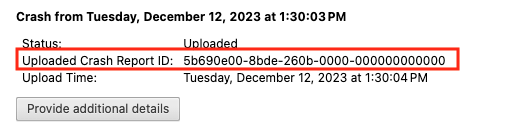
After you click the “Send Now” button, return to brave://crashes and gather up the Crash Report ID numbers that end with a string of zeros. Post the numbers, here, in a new reply. Example of a Crash Report ID number:
Same issue. After a system and winget (winget upgrade –all) update, click on the Brave icon, pop open the browser, and crash. This happens when in user mode or administrator mode. It happens even with the other “tweaks” applied. Edition: Windows 11 Pro Version: 25H2 Installed on: 2/11/2026 OS build: 26200.8117
Experience Windows Feature Experience Pack: 1000.26100.297.0 I can’t get Brave to open long enough to get its version.
Same. I restored my system to my last image before I installed Brave. I had to reinstall all other software that I need. I installed Brave thinking my efforts would pay off. Nope! A page crash is one thing; when your browser just abends, it’s time to start looking for another browser.