Description:
I am trying to set Yandex as my default search engine by adding it as a custom search engine. I found an existing solution on the forum, but the instructions ( Making Yandex your default Search Engine? ) seem to be out of date, as I cannot find the “Add” button mentioned in the steps.
Steps to Reproduce:
Open Brave Settings via brave://settings or the menu.
Navigate to “Search Engines” and then click “Manage search engines and site search.”
Look for an “Add” button in the “Search engines” section (Not “Site search“ that is irrelevant).
According to the old solution, the button should be there, but it is missing.
Expected Result:
There should be an “Add” button allowing me to create a new custom search engine entry.
Actual Result:
The “Add” button is not present, making it impossible to follow the previous instructions. The interface for adding custom search engines appears to have changed.
Not irrelevant – you can add Yandex this way and use it as your default.
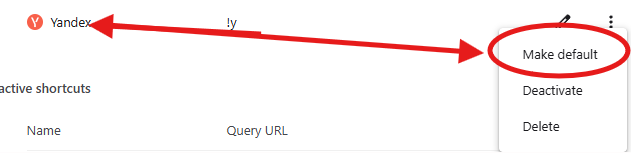
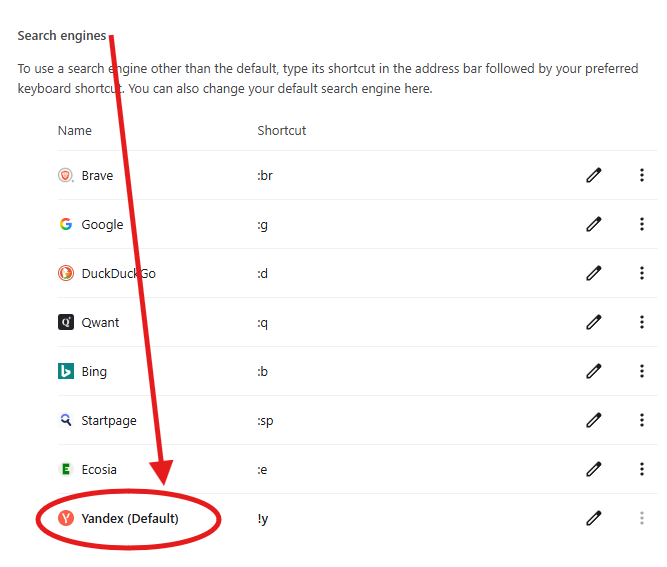
Or, as long as you have Index other search engines enabled (I think it is by default), if you’ve visited Yandex and performed a search before, you can go down to Inactive Search engines, find Yandex and click Activate. From there it will be in the list and can be made the default.
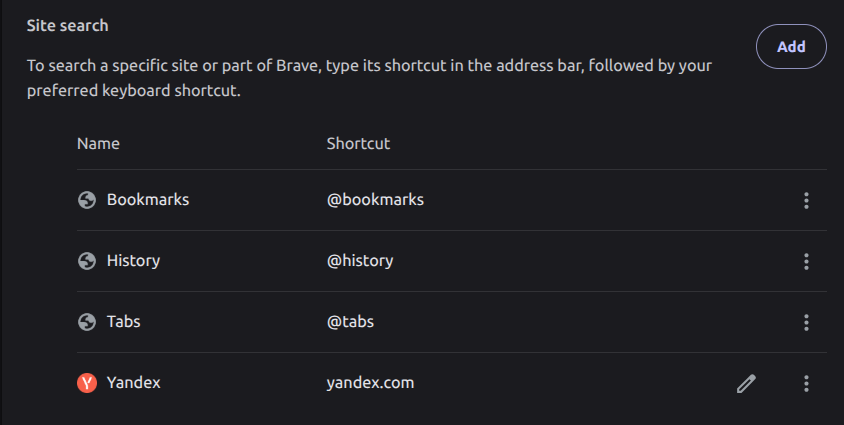
Thank you for your response. You are correct that I can add Yandex to the “Site Search” section, and I have successfully done so.
However, this does not solve my primary problem. When a search engine is added as a “Site Search,” it does not appear in the main “Search Engines” list. Therefore, I cannot select it to be my default search engine for the address bar.
With technology, and often with many things in life, try not to assume. Be willing to investigate. If clicking on things like the three dots in your screenshot you would have seen the option to Make Default and clicking that would have worked like you wanted. But you allowed yourself to automatically discard the thought.