After updating Brave today 18th of July on my Mac, Brave keeps crashing when I try to open it. It appears most quickly to immediately disappear again. I have tried to install Brave again but the problem persists.
Have never had similar problems with Brave before.
I’m getting desperate and don’t know what to do.
Can you please help me with this?
Best wishes
Mayki
**Brave Version I can’t find because of the problem I described.
This sounds like the same problem I was having(still happens sometimes). I saw someone figured out it was coming from the User Data folder and you could delete it, but it would get rid of all your data.
I eventually figured out the exact file that seems to get corrupted and causes this to happen. It is a text file you can just go in and delete and it will be fine, it just logs you out of everything, but saves your saved accounts. The file path is:
Hopefully this is the same problem! It’s annoying to have to go in and keep deleting it so hopefully it gets fixed and luckily it isn’t happening that often.
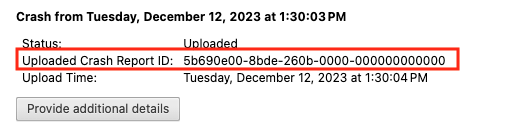
After you click the “Send Now” button, return to brave://crashes and gather up the Crash Report ID numbers that end with a string of zeros. Post the numbers, here, in a new reply. Example of a Crash Report ID number:
Do I have to be in Brave browser to enter brave://crashes into the address bar to view the Crashes page? If so, it’s not possible because the Brave browser shuts down immedeatly on starup.
A box comes up asking if I want to send a crash report to Apple. Could it work to copy that report and send it? If yes, where should I send it?
Re Crash Report to Apple - I would try to save that as a file, to your computer, for reference - if/when a member of Brave Support requests it (and, whenever they show, you may mention it).
Meanwhile, try:
Open a Terminal.app window, and enter:
open -a "Brave Browser.app" -n --args --disable-gpu --disable-extensions --no-experiments --enable-leak-detection --crash-on-failure --incognito
That command will start Brave Browser with Hardware Acceleration DISABLED, and using a New Private Window.
Brave is now working again, but it was not possible to restore the tabs from before the crash. In the meantime, I have been using Firefox and have missed Brave the whole time.