My brave crashed and the next time I opened it my passwords and accounts were KINDA-lost.
i can see my old requests/history but when im press enter(to enter gmail) google asked to loggin,and dont show autofill BUT if I start typing the first letter of my almost then it sees the variants (that is, information about my emails is somewhere on the computer,but when im trying to loggin it’s not showing password),all my bookmarks saved,metamask loggined,also i can’t sync my seesion,browser sayed that my sync code expired
,and when I followed the link to x, at first I was logged into my account but then kicked out
Brave Browser version numbers: 1.81.131 Chromium: 139.0.7258.66 (Official Build) (64-bit)
Operating System version numbers: Windows 11 Version 24H2 (Build 26100.1742)
The first link above, is information posted by Brave Community member @Saoiray - who also knows much more than I do, re Brave Sync involvement ← meaning, he will know what to ask you and how to guide you.
Your study of his info (at the link), will help you to be prepared. Also study:
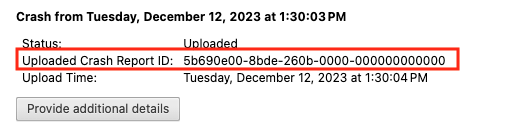
After you click the “Send Now” button, return to brave://crashes and gather up the Crash Report ID numbers that end with a string of zeros. Post the numbers, here, in a new reply. Example of a Crash Report ID number:
@dan54 has this happened more than once? Any specific behavior that led to the crashing? Any additional context you can provide is helpful to the team as they investigate.
I don’t know, maybe it happened because I had too many tabs open. The browser just crashed, and when I open it again, it asks me to reopen all the tabs, I did this but found that I was kicked out of most of the accounts and my brave sync was broken,This is the only time so far,my extension settings and metamask wallet were saved but the YouTube and Google cookies were erased