UX and Cloudflare issue (again)

Description of the issue:

I’m having serious problems with Cloudflare when using Brave. I’d say it started around May 2025, even though nothing has changed on my end.

Basically, when I visit a domain that outsources its security to Cloudflare and I’m faced with the waiting page to access the target page or I come across the Cloudflare widget, it goes round in circles and refreshes the waiting page and widget indefinitely.

I’ve tried everything:

- Running Brave without extensions,

- Disabling shields,

- Allowed all trackers and fingerprinting,

- Without VPN and without antivirus/firewall,

- Changed IP and hardware (even with the Brave mobile app),

- Deleted cookies and other data,

- Reset Brave

- Tested in private browsing mode,

- Disabled/enabled the Secure DNS option,

- …

The problem is not related to my activity either, because when I use another browser, I don’t encounter these issues.

As a result, as domains outsource their security to Cloudflare, Brave is becoming increasingly unusable. There are many domains that I cannot do without that use these services, and despite my interest in Brave, I am gradually beginning to consider switching browsers permanently so that I no longer have to endure this. I simply cannot access certain domains at all, even though they are vital (government, e-commerce, etc.).

Steps to Reproduce (add as many as necessary): For example, with the deepl.com login page.

Actual Result (gifs and screenshots are welcome!): https://www.awesomescreenshot.com/video/42868140?key=acf68ba0f8d953bb5c48fd630346d97a

Expected result: Please try to fix this.

Reproduces how often: Each domain that use Cloudflare DDoS/bot services.

Operating System and Brave Version(See the About Brave page in the main menu):
Brave 1.80.125 (Build officiel) (64 bits)
Chromium: 138.0.7204.184

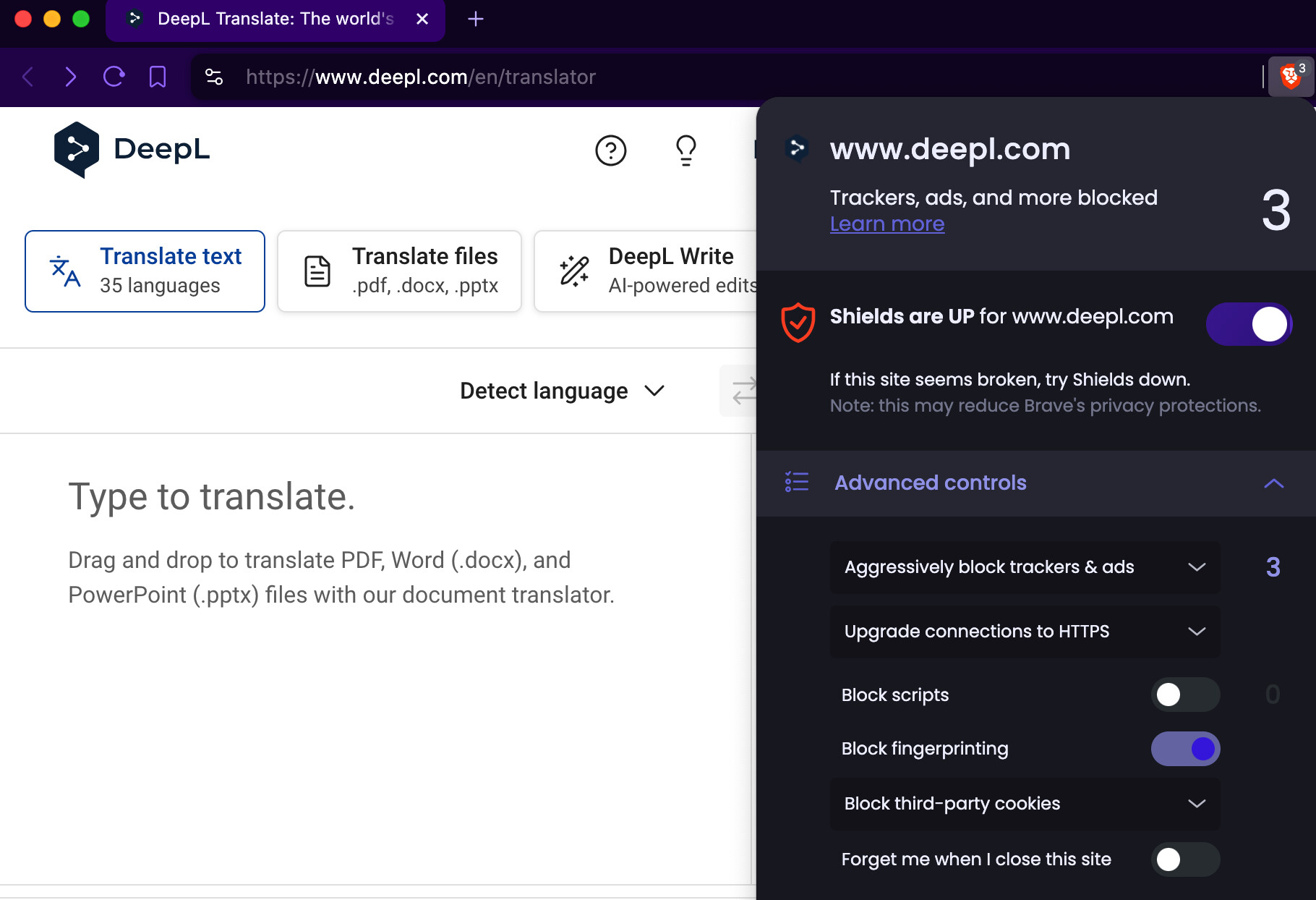
. . . frustrating. Compared to 2 months ago, I can now proceed through most of the mazes of Cloudflare Cops (whereas, previously, the Cloudflare Cops had me repeatedly ‘walking the line.’ So to speak).

Brave Browser = “BB”

I use Brave Private Browsing / Private Windows; and, BB Global Shields settings: brave://settings/shields

  • Set “Trackers & ads blocking” to the most aggressive level
  • Set “Upgrade connections to HTTPS” to the standard level
  • Do not block scripts
  • Block 3rd party cookies
  • Block fingerprinting

With Site Specific Shields UP.

Tips regarding Brave Shields:

I have more success, with:

  • Brave Shields UP
  • Either Allow All Cookies or Block 3rd Party Cookies, but NOT Blocking All Cookies
  • Allowing JavaScripts from specific sources, but NOT Allowing All JavaScripts
  • Trackers & Ads treatment: Aggressive (at first), and then incrementally relaxing that setting
  • Fingerprinting (aka footprinting) blocking: Strict (at first), and then incrementally relaxing that setting

I almost NEVER use:

  • All of Brave Shields UP
  • All of Brave Shields DOWN

Shields Basics

How do I configure global and site-specific Shields settings?

How do I use Shields while browsing?

I followed these steps, but nothing changed on the Cloudflare Cops side. The problem still exists. And I mentioned in my initial message that disabling the Brave shield didn’t change anything either.

As for the rest, I didn’t understand what you were saying: “BB Global Shields” (BB = Brave Browser?), Brave Shields UP (UP? Down? = On/off?).

Also, I even specifically allowed JavaScript to run for the Cloudflare domain, but nothing changed.

There is another problem with Brave.

Is there anyone from the Brave team who can answer this?

If anyone has a solution, please share it with us.

Working here, I’ve tested this in a clean profile Shields shouldn’t affect it.

Have you tried in Brave Beta or Nightly?

BB = Brave Browser

I corrected my previous reply, from “With Global Shields UP” to “With Site Specific Shields UP.”

Reading my “Tips regarding Brave Shields,” shows my gradual approach to the problem, but also has links to the Brave Support webpages that explain how to use Brave Shields.

I found that sometimes, relaxing the Site Specific Tracking & Ads, helped.

Sometimes, changing the server of the VPN service that I use, helps.

I use ‘https://www.deepl.com’ for translation on occasion; and I do not have account ←- so I cannot confirm the login-and-Cloudflare steps.

Maybe something like the following, is a cause:

Cloudflare’s Turnstile - an excerpt:

When a bot is detected, Turnstile uses “proof of work” to instruct the browser to waste computer resources, for example by executing useless code on the CPU or filling up memory in an attempt to reduce the number of requests emitted per second by each physical machine running a bot.

For testing an encounter with hCAPTCHA, try the Cloudflare community forum:

https://community.cloudflare.com/t/cloudflare-captcha-on-every-website/606078

Also, do not block domains (nor sub-domains of):

  • cloudflare.com
  • cloudflareinsights.com

And also, do allow JavaScripts from those.

Thank you for your responses.

I created a new profile and, sure enough, the problem disappeared. So I tried to figure out what was going on by disabling all of my extensions, even the least suspicious ones. The result: this travel extension (TripChipper (TravelArrow) - Travel Better) was causing the conflict with Cloudflare Cops. I have no idea why this particular extension, but now that I know this, I am suspicious of it. In any case, I have removed this extension from Brave and everything is working normally again.

Thank you all for your help in resolving this issue!

2 Likes

Thanks for taking the time to point out the issue! Was having the exact same problem, but I disabled the extension and I had no problems afterwards.

1 Like

Hi, Ricky from TripChipper here. We have resolved the interference issue with cloudflare. Please update to the latest version. If you have any issues please reach out to our support and we will respond ASAP.

This topic was automatically closed 60 days after the last reply. New replies are no longer allowed.