Ok, this is not a Brave issue at all, I know what’s up (Microsoft certified IT sys admin here actually, and this is something I know about, but I cannot help you, I can only guide you for safety reasons).
For one, if you get an error that a password is not recognized. It means either you did forget the password to your Outlook account, or it was changed at some point (by whom, we wouldn’t know, that’s between you and your Microsoft account to sign into and check for devices accessing your account from something signed in).
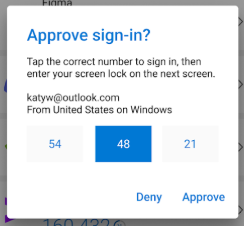
The number it’s asking for is entirely MFA as you had previously setup Microsoft Authenticator with your account.
(From Play Store screenshot of Authenticator, this is what the Outlook website is asking from you on Authenticator itself on your phone):
Basically you’d need to reset the password, and use Authenticator to assist resetting it, because you setup MFA with Outlook/Microsoft. (If it’s missing from Authenticator you were supposed to click “Restore” from backup, not create a new chain when you installed it. I made that mistake myself once.)
When I accessed my saved password, Brave had me put my PIN.
That’s your Windows PIN, the one you setup with Windows itself. The one you use to login to your PC with. That’s because to show you a saved password, Brave and all Chromium browsers must unlock the password from Credential Manager, a part of Windows cryptography, and that PIN is your key.
If at all you have no other way in, forgot everything, you’ll need the backup codes when you setup MFA on your Outlook account. You were supposed to write this down, print it, or take a pic of it and save it/keep it only in a secure place to never lose. It’s like a deed to your data. This would be the only way to get back into the account.
However, if you can sign into Outlook on your Android app, and the MFA is present in Authenticator, you should be able to use this combo to reset the password.
Just know, because this is the Internet, I can only guide you to this, but if you still are unable to get in, you will need to reach out to Microsoft for help with this. This is entirely on the Azure side of things.