Hello,
I note there are a number of requests that ask about disabling passkeys and you keep ignoring them even though they have thousands of views. Can you at least pretend you read these. I don’t want to add a passkey to amazon. Or anywhere else. It’s mighty annoying and if I’m okay with passwords, however safe they may or may not be, please don’t force other junk on me, I’m an adult and I can take care of myself online (and if not, that’s not your problem but mine.)
So, as a request, offer an option to completely opt out of passkeys.
Thanks.
2 Likes
I remedied this by dropping the Brave browser and using DuckDuckGo’s browser. No more annoying passkey requests where I have deleted them on the destination site (such as Amazon) when logging in as I was getting with Brave. I know it’s not the solution to fit all, but I grew tired of Brave ignoring this and a few other issues for far too long.
2 Likes
I just recently had a windows and/or brave update that started kicking me out of all google accounts daily and has an annoying passkey popup that pops up over google/other login forms, even blocking my list of logins from bitwarden.
I’ve had bitwarden set properly as my password manager in brave, and have passkeys disabled in bitwarden, and have done everything I can to try and disable windows hello; but I cannot rid myself of the passkey popup in brave.
I haven’t changed ANYTHING and it just started doing this about 2 months ago. I have my windows setup to only install required security updates so this may have started for me later than for some other users.
Brave works when it works, but then seasonally just doesn’t work and becomes a huge headache and point of excessive frustration. Even simple things like browser settings sync doesn’t actually sync the settings from one pc to the other. What a joke.
I’ve found that after going back to firefox so many times, I’m just going to stay away from brave.
1 Like
Yeah, this is enough to get me to drop Brave as well if it’s not fixed. The whole reason I started using Brave is to have privacy and freedom. I don’t want passkeys pushed onto me every time I try to log on.
Yeah, considering dropping as well. So insanely annoying on windows. I have it totally disabled in windows and yet brave still interrupts with requests.
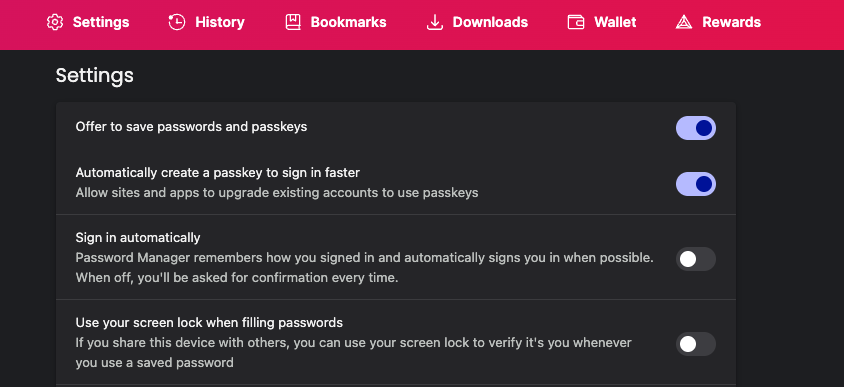
If you use a third party password manager, you can just disable the option for the browser to offer to save passwords/keys entirely.
If you want to use the built-in pw manager, you can stop the browser from prompting you to upgrade existing accounts into passkeys.
Both options can be found by going to brave://password-manager/settings:
Using an external manager, brave still prompts if there’s a passkey request at least with roboform and with lastpass, this is prior to the password manager interacting with the request. So, even if I have passkey management disabled in the external password manager, which isn’t always possible, we still get the passkey request directly in brave.
Just wanted to add in, I see the same thing as everyone else. Using LastPass, all Brave password/passkey options turned off in brave://password-manager/settings. All LastPass setting setup to not ask. Browser version is auto updated, currently
Brave 1.84.141 (Official Build) (64-bit)
Chromium: 142.0.7444.176