Description of the issue:
When right clicking on Brave logo from Taskbar, the only options that appear are “Unpin from taskbar” and “Brave” (which opens a normal window). The option for “New Private Window” is missing. This is causing me to open a normal window everytime I want to open a Private Window.
Windows 11 24H2, 26100.4946
How can this issue be reproduced?
-
Pin Brave to Taskbar (Win 11)
-
Right click on that Brave icon in taskbar
Expected result:
There should be more options when right clicking on Taskbar logo such as “New Private Window” or “New Private Window with Tor”
Brave Version( check About Brave): 1.81.136 (Official build)
Additional Information:
I know that I’ve seen this issue before but I’m unclear about what causes it. May be a permissions issue. Testing on my end I do see all the available context menu options when I right-click the icon in the taskbar. Let me ask a few team members about this and get back to you asap.
Thank you. Forgot to mention this but this issue occurs mostly if you installed/re-installed Windows in the past 6 months or something. For me, this issue occurred first time on a new laptop in May, then on this new PC. On my 2yr old laptop, it’s not an issue.
Hi, were you able to find a solution?
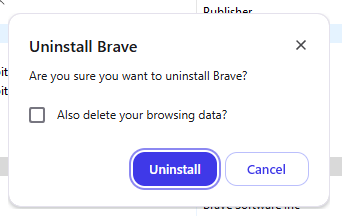
I think you can resolve this by simply un/reinstalling the browser. Note that when you do this, make sure you do not elect to delete your browsing data as well when Windows prompts you to do so, otherwise all your browsing/profile data. will be cleared out as well and you’ll have to start fresh.
The prompt should look like this:
After you reinstall try right-clicking on the Taskbar icon again and let me know if the issue persists.