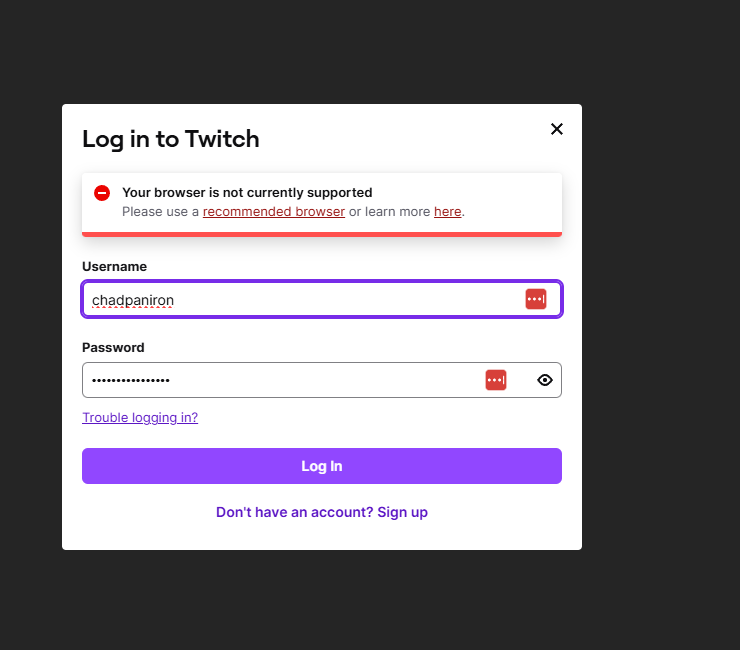
What happens if the user-agent is spoofed to something else like Edge/Google Chrome/Firefox? (While leaving shields up)
Also have you tried with shields down? This could help determine what it is they are detecting and blocking specifically (either the browser itself since Brave by default presents itself as Chrome usually, or the anti-fingerprinting itself which is alarming that they want it that bad, like my CC agency I had to deal with, Brave wasn’t supported until shields were entirely down).
I was able to login about a week ago with the shield set to standard. I didn’t see the error message either. I added the Twitch Adblock Rules and the Experimental Adblock Rules filter lists.
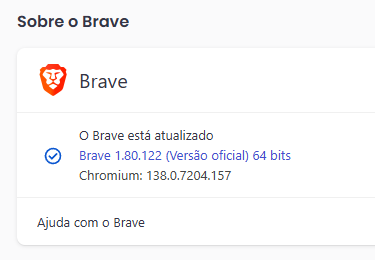
Update your browser I am pretty sure thats what it means when it says your browser is not compatible. At least whenever ive gone to the site and its said that after updating its always worked
You have the latest update? Then my next guess would be are you using the content lists? It could be the experimental features.
Clear the browser cache
Check your browser extensions (if any)
If that doesn’t work then its definitely your browser settings. Most likely it’s detecting that your blocking something and want you to NOT do it.
So a content list that is enabled that it doesn’t like, third party cookies being blocked, or data not being able to be saved to the device.
That’s the only things that would cause that message to show. Review your settings and I’m sure you will see something that’s not enabled that should be or something disabled that should be. It’s not a brave browser issue. In my opinion, it’s more of a twitch issue. The next option is to talk to twitch support and you will get told to “just use chrome or edge because those browser work the best” at handing over all your data regardless of your settings.
It makes no difference if your using a VPN or DNS. dated, it’s one of the other things I mentioned. You would be less likely to have a problem logging in when your NOT using a VPN but either way on twitch VPN is not the problem. DNS not the issue. Would be a totally different outcome and not that message. Its the browser setup usually because you’ve got the latest version.
Samething!
On a new install of nightly. So none of the cache or what ever nonsense. Plain and simple? I can’t fucking log in.
I can watch streams. But no log in.
Here look
Hey everyone, new here but I looked through past discussions on this forum + Reddit as I had the same problem for the first time. Cleared cache and everything else, disabled all extensions, disabled Brave shields, disabled VPN, to no avail. I’m definitely not an expert, but I thought: “hey, let’s just try with a private window” since it would take me 3 seconds and… It actually worked?!
So… Yeah, being a total tech-noob as I said, I have NO idea how much stuff is different in private vs non private, but for me, there definitely is one thing that is/was key; I just can’t identify it…
(And for the record, I DO assume that this is something that Twitch is doing to target various browsers; not JUST Brave, but I have this idea just because I read a lot of comments saying that. Like, “yeah, it would make sense”, you know?)
If anyone has a gut feeling that it could be X or Y with this info, I’ll be glad to test but you’re gonna have to explain what to do as if you were talking to an 8 year old kid… Sorry…
Same here. Can’t login on Nightly. I can login in the Default Orange Icon Brave, but ads are not being blocked. Nightly was a fresh install as well.
Not sure about Beta, because since yesterday it doesn’t even open. I installed Beta on top of itself, it still doesn’t open. My crashes folder is empty.
Private opens with no cookies loaded. Also unless you changed the settings to allow extensions to run in private window, it also loads with no extensions.
That’s the only difference really. Private has no cookies and no extensions. Then when you end the private session it deletes all cookies and history from the browser for that session. That’s it…nothing more.
So if something works in private but not in normal, it’s cookies or extensions.
Also when you say cleared cache, do you mean cookies? And if so, did you make sure to do it for all time or what setting did you use?
What I’m referencing is the drop down you can choose, such as below. The default time period is just Last Hour which often wouldn’t solve things.
Yeah I did clear cookies from all time, not just last hour.
Fun fact: I closed the private window at some point, then re-opened one, tried logging in while I was using a VPN, and this time, it didn’t work, so I turned the VPN off and it worked again, but that just makes me even more confused, because I definitely tried with no cookies + no VPN + all extensions turned off + non private window before trying the private window and it didn’t work at all…
I too have the same issue, the only way to bypass it for me is to open a private browser, but it would be more convenient to be able to access in a normal one.
Don’t know if you already solved that issue. I was facing this problem for 2 days and just found a solution. I’ve just created an account to share my solution to this issue (actually, Grok’s solution):