Troubleshooting technical issues is much easier when both the user and support agent practice clear communication. For this reason, we have provided the template below for you to fill out with information about your issue. Please provide as much detail as possible so we can most efficiently resolve your problem.
Description of the issue:
I want to disable the casting feature in Brave on Android. When watching videos, the cast button appears and sometimes it connects to my TV by mistake. I want to know if there is any option/setting to turn off casting completely.
How can this issue be reproduced?
Open Brave on Android
Play any video online
Cast button appears automatically
Expected result: Casting should be fully disabled or an option provided to turn it off.
Brave Version( check About Brave): 1.85.117
Mobile Device details
Additional Information: Looking for any workaround, flag, setting, or update that can disable casting.
Thanks for the suggestion! Just to clarify, there’s no Extensions option in the Brave Android app — so I’m not seeing any way to follow those steps. I’m on Brave 1.85.117. If there’s another path or updated method, please share
Either Brave team member @Evan123 or Brave Community member @Saoiray will probably know how to proceed. And at present, you are more like to hear from @Evan123 by Monday, if not sooner.
Yea, Android Brave never had extensions. That was kind of always a Firefox thing on Android where it had extensions. (Would be nice if a Chromium based browser on Android would adopt extensions for once.)
But I did check flags for you and these don’t exist on Android whatsoever (but do on PC, such as media routing, etc.)
Confused how. It’s a multistep process. Not like you just tap once and it starts streaming to devices.
This is primarily just an Android thing. This is especially true as you’re connecting to a WiFi with other Google products like a Chromecast. It is considered a core system feature.
I’m on iPhone so I can’t go digging and testing on Android, but I did just try searching the internet…something that’s good to do but a lot of people seem not to want to spent the time. I found two things mentioned:
First potential solution/workaround
I’m not sure if it still works but a while ago people said you could disable device discovery which would stop it from showing up. For that you’d go to your Android’s Settings → Google → Devices & Sharing → Cast Options → disable Use network information.
Other workaround:
I’m not sure if that will work, but is what I’m seeing suggested by some. Otherwise you can browser in incognito or use something.
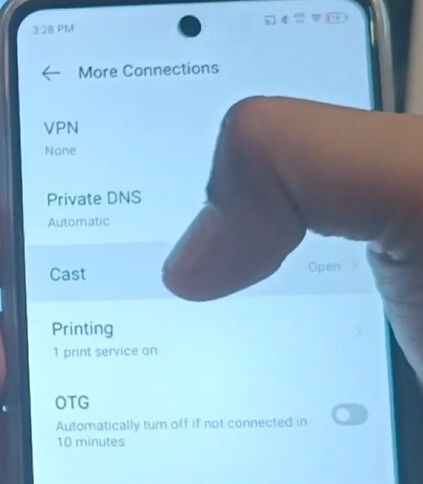
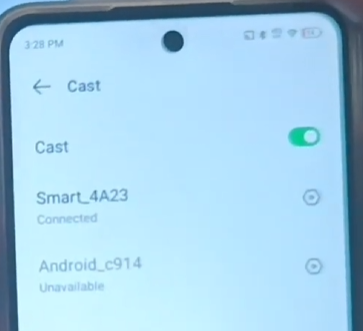
And actual settings/control in the Android settings?
Or I’m not sure if bits of https://www.youtube.com/watch?v=NPfJ6ulYRIc might be showing. This makes it look like there is a toggle to turn Cast on or off, as well as control what’s connected.
So on my case, because my Android phone is modded with LineageOS 23 (otherwise I’d be stuck on Android 12, not on Android 16), one quirk about my build of LineageOS is casting doesn’t work, it’s broke (going to the setting will crash).
But, Brave and YouTube? Because it’s broken at the Android level, no such casting icon ever shows up in Brave, nor a popup to cast to a TV, indicating the setting Saoiray referred to should turn off casting, but it’s system wide, not per app unfortunately. (Not until Android has “Cast” as a permission per app.)
(@Saoiray , on Android, at least my old stock OnePlus ROM, it really is that easy to accidentally cast, it likes to auto-pick a TV for you, and at times the blue button just pops up right when you’re tapping. It’s an Android thing for sure, not Brave, and in my case, it being broken is a blessing because that same popup happened on the official YouTube app as well, and that too now longer happens.)
Yes, its not a 1 click issue but 2 click for me and i tried a lot of settings from google itself in my phone’s settings but nothing worked and nearby devices permission is disable in brave but still it keeps searching the nearby devices