Same issue here. It makes notifications nearly useless as they vanish for me after 5 seconds and there is no trace of them in the Action Center. Will have to switch browsers again if this can’t be fixed soon.
@Ziflin,
Are you both certain that your Focus Assist settings are configured properly? I’m able to receive push notifications from Gmail, as well as several other sites (including Community) without issue.
@Mattches, I don’t even know what my Focus Assist settings are. Let me look into that. Thanks so much. I was wondering why I haven’t heard anything on this. Thanks so much!
@joshm65,
Can you confirm for me that you’re using the latest release of the browser? Should be v1.1.21 at the time of writing this.
Are you able to receive other desktop/push notifications for other sites? Would you be willing to test using this website? https://web-push-book.gauntface.com/demos/notification-examples/
Note that when you land on the page, you’ll be prompted whether or not to Allow notifications from the site – this may seem obvious but make sure you do selectAllow when you see the prompt. Then click on the example notification and see if you receive the push notification as intended.
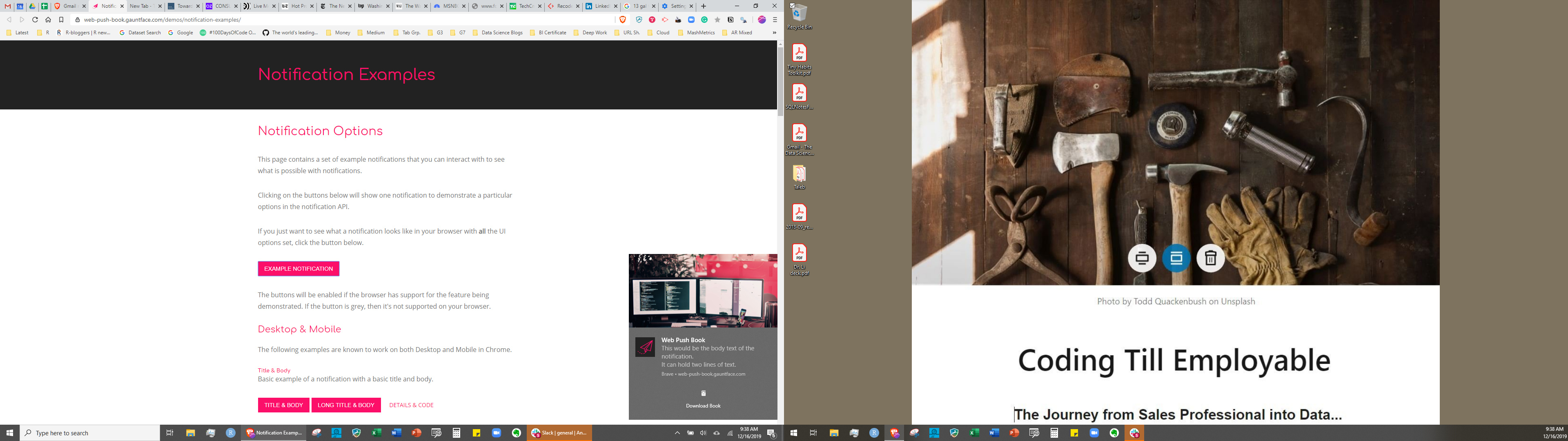
Didn’t get the initial Action Center “this is where you’ll receive notifications” message but did get the following notification, seen in snip on left hand side, lower right corner (apologies on the dual screen-shot), in Action Center from the web-push-book site.
I get the “Allow” question for Gmail and Google Calendar. I always answer yes. When I do so for Google Calendar I then get a notification in Action Center, roughly paraphrased “This is where you’ll receive the calendar notifications”.
@joshm65,
Interesting – thank you for the details.
I have a couple of suggestions to try:
First, can you try clearing your cache/site data for Gmail (note that you’ll have to re-authenticate into gmail afterwards), relaunch the browser and see if you’re prompted to allow (and subsequently receive) gmail notifications afterwards? To do this, go to gmail, click on the “lock” icon, then Site settings --> Clear data and also elect to Reset permissions for the site as well.
If the above yields no results, can you try either disabling your browser extensions – or, creating a new browser profile (which will launch a new instance of Brave without any browsing data or extensions enabled), login to Gmail and see if you can illicit push notifications on this new profile?
I apologize for any confusion – it seems as though you’re looking in the Handlers section of the site settings – the page you’re looking for should have all site settings for gmail.
Before we get to that, I’d like to note that I did find an open issue that I If you’d like to try one more(for some reason) believed to be already resolved but it seems that it’s still being worked on:
So the cause of the above linked issue could very well be what you’re encountering. I’ll add your report to the GH thread on your behalf, as well as make some noise internally about getting this resolved, as the issue itself is quite old at this point.
Just for future reference, you can find the options I described in my previous post by doing the following (note that my example is on Community but the process and options is the same):
Reset correct settings as detailed above to no avail.
Had a look at the Git; from my read there was not a solution there. (Which may be you last point, about this being a legacy issue; not just the duration from when I posted)