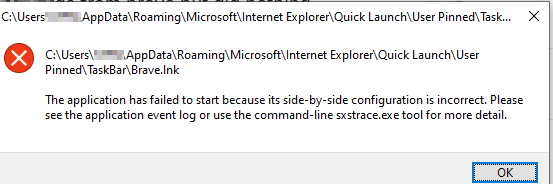
I have been using brave for years at this point but it has really started acting up these past months starting with random password resets and then Web App stopped working.
Now it has hit another level that I cannot even start or uninstall the application…
This is what i get when I try to start Brave
And here is when I try to uninstall it
I havent done ANYTHING to brave it just stopped working for whatever reason.
Any help?
Are you usually running Brave as admin or did you install as an admin? Please try the solution listed here. Thanks!
opened 04:28PM - 27 May 24 UTC
bug
feature/shields
needs-investigation
OS/Windows
webcompat/shields
OS/Desktop
Chromium/reported upstream
### Description
For quite some time now I have been seeing users complain about… things like Widevine not being recognized or ads no longer being blocked. Typically those experiencing this issue will be able to go to **brave://components** and will see something that says **Update Error** and will display **Version 0.0.0.0** for components. This is especially happening with the components associated with Shields.
In the past, this could be fixed by launching as administrator, but this doesn't seem to work anymore. There have been a variety of workarounds by users, but it seems like it should be more important to get devs to work on this. I've reported it to Mattches and others, but haven't seen any open Github issues or movement on finding solutions. Perhaps it's just internal only or I'm missing it, but wanted to bring here and hope we can get some eyes on it. Thanks
@rebron or @ShivanKaul either of you able to handle or pass to whoever can?
### Steps to reproduce
1. Open Brave
2. Go to content and experience issues
3. Go to **brave://components** and realize it won't update
### Actual result

### Expected result

### Reproduces how often
Intermittent issue
### Desktop Brave version (brave://version info)
This has been happening for a very long time across Desktop and Android, with primarily occurring on Desktop. Hope you don't mind me not putting in revision and all here.
### Android device
Misc. Please see variety of links in Miscellaneous Information below as an example.
### Channel information
- [X] release (stable)
- [ ] beta
- [ ] nightly
### Reproducibility
- [X] with Brave Shields disabled
- [X] with Brave Rewards disabled
- [ ] in the latest version of Chrome
### Miscellaneous information
**Posts for example:**
https://community.brave.app/t/the-adblocker-is-not-working/550312/2
https://community.brave.app/t/why-i-am-seeing-youtube-ads-in-brave-browser-again-and-also-component-update-error/546476
https://community.brave.app/t/fingerprinting-protection-no-longer-as-good/548139/11
https://www.reddit.com/r/brave_browser/comments/1cl3gtc/unable_to_drag_and_drop_files_in_youtube/
https://www.reddit.com/r/brave_browser/comments/1ck069h/ad_block_suddenly_doesnt_work/
https://community.brave.app/t/several-brave-components-are-not-updating/539258
https://community.brave.app/t/widevine-content-decryption-module-status-update-error-version-0-0-0-0/536020
https://community.brave.app/t/youtube-still-blocking-ads-component-issue/531055
https://community.brave.app/t/getting-ad-blocker-from-youtube/528672/6
https://community.brave.app/t/update-errors-on-components-page/519950
https://community.brave.app/t/brave-component-updates-fail-with-error/513846
https://community.brave.app/t/component-update-issue/510694
https://community.brave.app/t/youtube-ad-blocking-was-glitched/497287/5
https://community.brave.app/t/brave-shields-is-not-working/445208/8
https://community.brave.app/t/brave-ads-resources-error/271085
https://community.brave.app/t/brave-android-ad-block-doesnt-block-ads-brave-adblock-page-is-empty/215943
https://community.brave.app/t/brave-shields-ad-blocker-not-working-after-new-install/181478
https://community.brave.app/t/internal-component-fail-to-update/149628
https://community.brave.app/t/brave-stopped-blocking-ads/538720/17
**Examples of suggested workarounds/solutions**
https://community.brave.app/t/brave-stopped-blocking-ads/538720/32
https://community.brave.app/t/brave-stopped-blocking-ads/538720/8
https://community.brave.app/t/brave-stopped-blocking-ads/538720/13
I am not running it as admin neither have I installed it as such. I have been using brave for years now and it just died on me. I am kinda annoyed that I cant even uninstall it…
That wasn’t the question or concern. Some people have been seeing that Windows is reassigning permissions as updates happen. This is outside the control of users. Though the chances of the issue increases if people are launching as admin, whether it be through the Compatibility part of Properties in the shortcut they are using to launch the browser or by doing a right click thing.
Regardless, they were suggesting you follow the steps as it provided just to make sure that the permissions haven’t changed due to this update glitch that has been impacting people, such as you see in the thread at Brave doesn't start when I run it as administrator and Brave Shield doesn't work
Stefflo:
uninstall it
Have you tried installing it? To be clear I mean to go back to https://brave.com/download and run the installer. If there is something missing or corrupt in the files, installing on top would be a manual patch to fix it.
Of course, if it’s the admin issue or something else, then that won’t matter. But at least it’s a step to try.