i had my previous iphone synced with my mackbook yet now i can’t get my new iphone to do same
Help
Hello @AdvTano
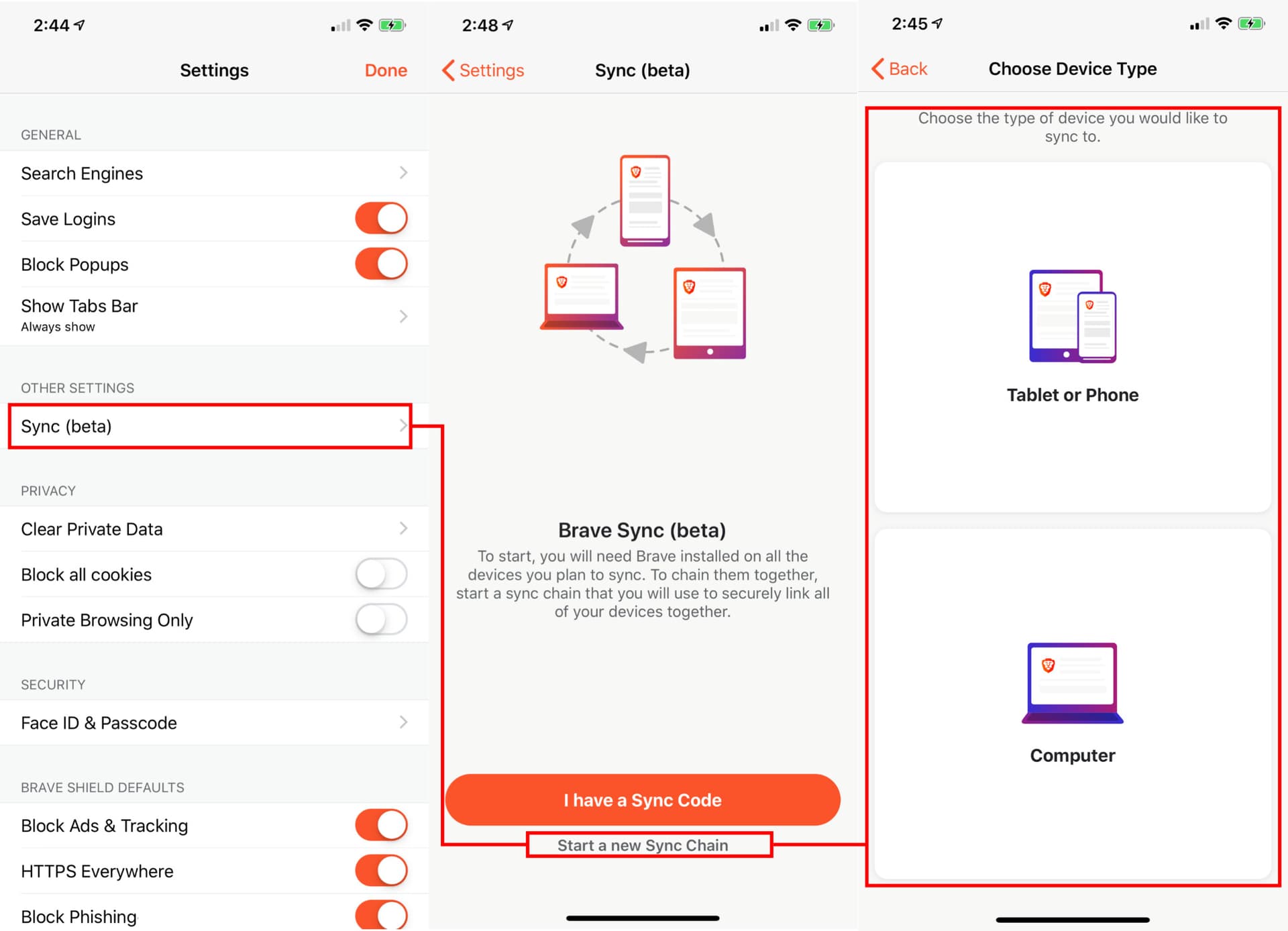
Thanks for bringing this to our attention and I’m sorry to hear you are going through this. There’s no “I have a sync code” button on your mobile?
Be waiting for your response!
NO
Both give me same sync add new device tablet//iphone or computer next page gives me instructions for “i have sync code” and gives me a tread this code like a password
Hallo,
same problem here, iphone 7 and linux mint. I can’t read the qrcode on pc from iphone, cause there’s no option to do that.
thanks
anto
@anto @AdvTano,
This typically happens when you add both devices to separate Sync chains, rather than the same one. To resolve this, on your iPhone, go to Settings --> Sync and select Leave Sync chain.
Now, on your desktop, open Brave and go to Settings --> Sync --> Managed Synced devices and click Add new device --> Phone/Tablet and the QR code will be displayed. Now on your iPhone, go to Settings --> Sync --> I have a Sync code.
Scan the QR code on your desktop with your iPhone and you should be good to go.
Thank you
thank you so much, it worked!
anto
You’re very welcome!