I accidentally hit something and viewed the page source in a split screen. How did I open this feature? It is really handy.
Mattches
2
@Jdillinger,
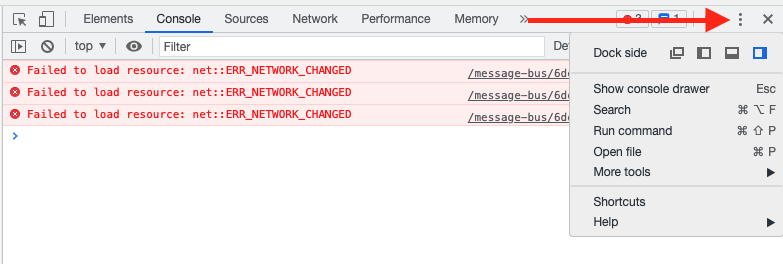
Are you referring to the page source — Ctrl + U on Windows, Option + Cmd + U on macOS — or are you referring to the Dev tools console? If dev tools, you can change the viewing options by clicking the “more options” (three dots) icon on the top right of the console window:
Related topics
| Topic | Replies | Views | Activity | |
|---|---|---|---|---|
| Html source code: view source page | 1 | 10153 | March 9, 2021 | |
| View source in Brave | 2 | 5449 | December 30, 2021 | |
| Split screen just as in microsoft edge browser | 0 | 487 | July 31, 2023 | |
|
Open link in split view
|
2 | 137 | October 8, 2025 | |
|
Brave page source
|
0 | 448 | September 4, 2021 | |
| Change view source text editor? | 1 | 5296 | July 19, 2020 | |
| Please let me turn off split view | 1 | 237 | October 10, 2025 | |
| Have Split Screen | 0 | 79 | December 5, 2024 |