As I’ve seen some confusion in understanding Brave Ads Catalog Viewer, https://sampson.codes/brave/ads/my_region/ , I thought I’d post here to break things down a bit. I won’t describe EVERYTHING on the page but I will explain everything that is important for Users to know.
Available Ads/Campaigns in your region

You’ll always notice on top a banner that shows how many campaigns and ads are in your region. Campaigns are what matter the most, as this is how many places are paying for you to see ads. One campaign can have tons of ads, but you’re also limited on ads you can see.
VERY IMPORTANT
Just because campaigns are in your region doesn’t mean you can view ads from each campaign. This is because they may target just a specific part of your region, only want to be seen on a particular Operating System, etc.
BAT Price
To the right of the Payout Status is usually a little ticker/widget that shows the current trading price for BAT.

Campaign Progress/Status
On the left of this status bar is the day that the campaign started and on the far right is when it ends. The percentage bar you see is how close it is to finishing. So the fuller the status bar is filled with blue, the closer it is to ending. Then in the middle is the actual percentage of completion for the campaign.

View Limits
You’ll see this section showing View Limits. This is how many times you can see ads in that particular campaign each Day/Week/Month/Year. So for the image below, you’d be able to see ads up to 10 times in a one day, but once you hit that 10 ad limit, you’d not see ads from that campaign anymore.

Not all will max out as quickly, such as the one below which lets you see ads from their campaign up to 5 times per day, but a maximum total of up to 66 times.

That said, some will be horrible. Such as one below that ONLY lets you see their ad once, and then never again.

Value
This is how much BAT you’ll earn every time you see ads from that campaign. Value varies greatly and some campaigns pay well while others hardly pay anything. Just to show some of the range, below are some screenshots of how much pay we get per ad


OSes
Kind of common sense, but this is the Operating Systems that the campaign is targeting. Some target all while others are very specific. If you’re not familiar with the icons, it breaks down like this:
Alien Head = Android
iOS square = iPhone/iPad, etc
Penguin = Linux
Apple = Mac
4 squares (window) = Windows

Again, keep in mind, not all campaigns target ALL devices. Such as below:

Creatives
This is just how many ads that exist within that particular campaign. However, one little thing to pay attention to is one campaign can have multiple sets of ads with different rules. So you’ll need to watch their View Limit and OSes for each set.

Regions
It’s easy to take this for granted, but this is the areas they are targeting. Generally you’ll see a generic region, such as in the screenshot below:

However, it’s important not to assume that it will always show for your region. For example, I’m in Florida but one of the ads being shown for me on the page shows Texas only.

So if I had just assumed I could see all campaigns, I’d be doing myself wrong as I wouldn’t be able to see ads for the one targeting Texas.
_
QUICK RECAP
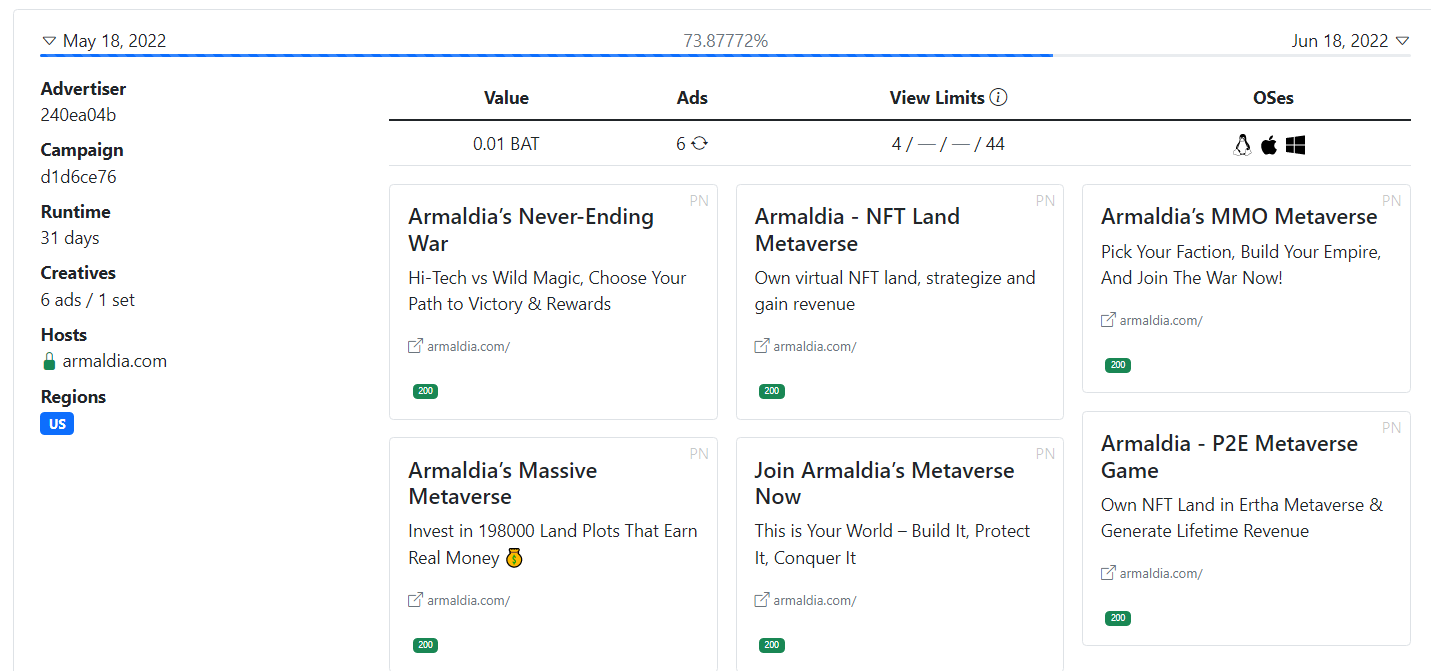
Based on screenshot above:
- This campaign started on May 18, 2022 and ends on June 18, 2022, a total of 31 days. (it’s 73% complete)
- This campaign has 6 different ads.
- Each of the 6 ads pay 0.01 BAT each time they show
- I can only see any these ads from the campaign 4 times per day (so won’t be able to see all 6 ads daily)
- Once I see the ads a total of 44 times, I can’t see this campaign anymore (or won’t be paid if it does show more on accident)
- Campaign is nationwide, showing to all United States
- Campaign is only available to Desktop devices, as it shows Linux, Apple (Mac), and Windows.
Unfortunately, it doesn’t show us how many times we’ve actually seen ads from the campaigns. So we don’t know if we’re at or near the limit.
I ignored Hosts, Campaign (ID), and Advertiser as we don’t generally need to worry about those. Also not talked about is how it shows us what the ads look like, so you can sample each ad if you want. That’s just because those things usually aren’t important to Users.

