The Tab Search popup appears outside the browser if vertical tabs are enabled and the focused window is not at the left of the screen.
I expect to see the Tab Search popup appear in the standard, consistent position, to the right of the Tab Search button, in the pushed-features right tail of the extensions gutter, of trustworthy chromium input real estate.
Tab Searcher in my current configuration 1) with vertical tabs (VT) and 2) using the shortcut to invoke it (SCI):
is hidden when I have another macOS app window pinned(-front) to the left of a Brave window, where I can’t see it and so have trouble diagnosing
changes position if the active browser window resides near the left edge of the screen
the Tab Search shortcut, on macOS, does not function to toggle view of the shortcut on and off, only on.
In an indictment of the upstream chrom/ium implementation: this failure to toggle alone makes usability strictly worse than the Quick Tabs extension (and similar) that inspired the feature, and which still provide the unmatched capacity to show a count of open tabs in the browser or window. It’s also slower, shows fewer tabs, and wastes more as whitespace – but again this is a Chrome upstream feature.
How can this issue be reproduced?
On macOS, unknown for Windows, on Linux: consistent placement at inside edge of VT favicon gutter (using SCI):
Using browser window more than ~100 px from left screen edge, invoke Tab Search by (System) Keyboard Shortcut, Cmd-Shift-A default.
Compare with browser window positioned <~60 px from screen edge. Notice it opens align to the right edge of the favicons edges in the Vertical Tab gutter
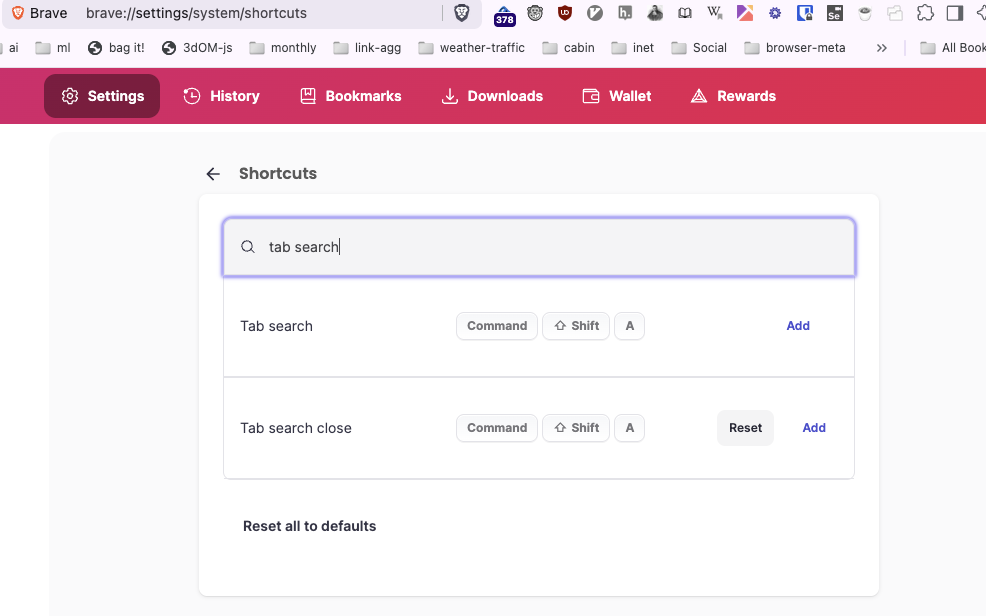
Also, notice the repeatedly invoking the system shortcut, Cmd-Shift-A, does not toggle. (Even when, in brave://settings/system/shortcuts /Tab search close/ in addition to /Tab search/ is bound to Cmd-Shift-A. Ctrl-Shift-A is not allowed to be used for both Ts and Ts-close, but Cmd-Shift-A is allowed to be bound to both, though it has no effect to close.)
Expected result:
I expect to see the Tab Search popup appear in the standard, consistent position, to the right of the Tab Search button, in the pushed-features right tail of the extensions gutter, of trustworthy chromium input real estate.
Brave Version( check About Brave):1.80.120 Chromium: 138.0.7204.101 (Official Build) (arm64)
Thank you for the detailed report.
That said, I can’t seem to reproduce the issue, but I also may be performing the steps wrong, as they are quite specific. Would it be possible for you to upload a short recording of the behavior so I can visualize it better and make sure I’m testing correctly on my end?
You can upload here on the site directly (I think max upload size is 20MB) or upload to a site like imgur and share the link.
0:03 position of Tab Search, opened by keyboard shortcut, outside of window.
0:09 position of Tab Search, opened by button*, positioned next to button and separate from vertical tab gutter
0:21 new window – Tab Search by shortcut with room left, already shown, Tab Search opened by shortcut too little room left (Opens in preferred overlay to right of vertical tabs), in existing browser pixel real estate
0:26/0:27 in new window, Tab Search button does not appear until Tab Search has been invoked by keyboard shortcut (which feels incoherent – users will primarily use shortcut or prefer to click – and additionally, the positions differ based on shortcut versus button
I’ll add one more to my list of concerns. The Tab Search button disappears if not used (hmm, no, search functionality is present in the Vertical Tab view on mouseover, and once clicked, it remains in the top-bar (won’t comment further because I’m not quite sure what my-, nor presumed user-, -expected behavior would be).
(For video upload, it was enough to downsample and convert to mp4, from Quicktime’s natibe screen recording into .mov. Downsampling and trimming might not have been necessary, but help as simple improvements to size and focus of clip.)
Okay yeah I see exactly what you’re saying here – video was super helpful, thank you for sharing that. It does look like a bit of a bug – I’ve asked the team to take a look at it and will likely file an issue for it on Github shortly.
Alright, so, once Tab Search is only offered as a button, the Tab Search popup will be based there. I suppose that does address my title question.
On first read I was unclear whether:
a tab search activation button will still be present in Vertical Tabs wide-gutter, even if Tab Search button is the loading point for the popup → Now I see: no
Initial report said
Expected result
The horizontal tab search button shouldn’t be shown on vertical tab bar when the Show Tab search button settings is disabled via brave://settings/appearance
but settled on
rebron commented 2 weeks ago / rebron
Discussed this issue with @bradleyrichter. Let’s remove the tab search icon (magnifying glass) from the vertical tabs panel and stick with the one tab search button that’s on the toolbar. https://github.com/brave/brave-core/pull/29949
I have tried it in Nightly. It’s nice to have the shortcut open a consistently placed popup that falls fully within the existing screen real estate of the foreground browser window.
Tab Search keyboard shortcut(s) could support toggling, on and off, on repeated presses. (Notably also, this
“Cmd”… Tab Search / Cmd-S-a // Tab Search close / Cmd-S-a
while attempting to set
“Ctrl”… Tab Search / Ctrl-S-a // Tab Search close / Ctrl-S-a
triggers a popup reporting that it’s not allowed to set both/(any two) shortcuts to the same trigger.
I just want toggle functionality.