Troubleshooting technical issues is much easier when both the user and support agent practice clear communication. For this reason, we have provided the template below for you to fill out with information about your issue. Please provide as much detail as possible so we can most efficiently resolve your problem.
Delete the any text above the line separator below before posting
Description of the issue:
How can this issue be reproduced?
-
Description of the issue:
How can this issue be reproduced?-
I go to Settings/About Brave to attempt to update desktop software on a new Win 11 PC
-
A Windows UAC windows pops up and I click Yes to allow App to make changes.
-
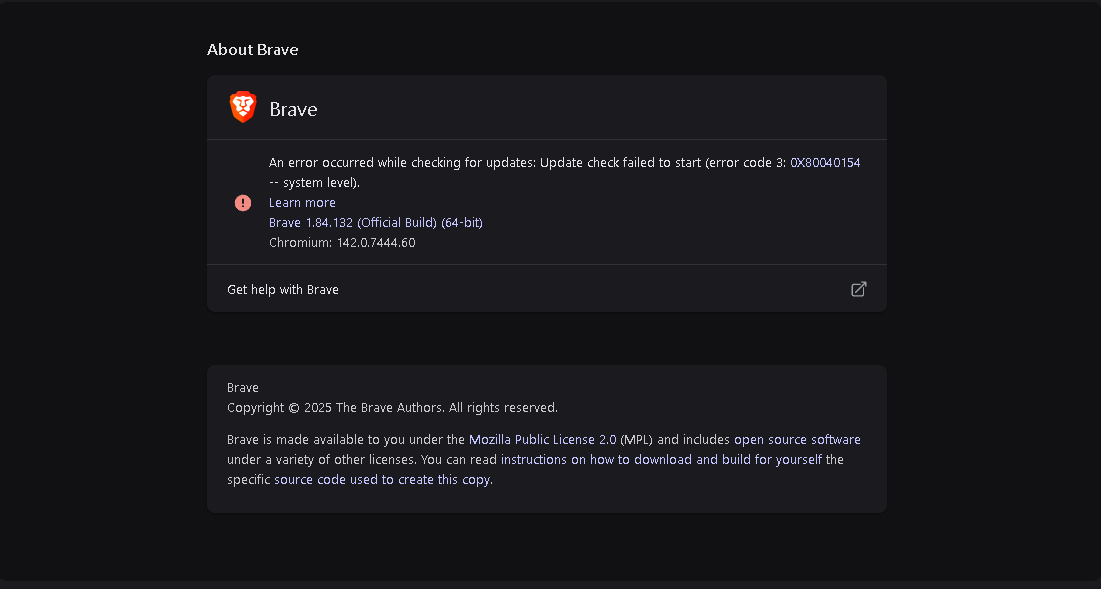
Then the update fails. The same exact thing happens for both Chrome and Brave.
-
Yes this can be reproduced. Happens every time. Tried uninstalling Chrome and reinstalling it.
-
Expected result is to get the latest version of Chromium, Version 143.0.7499.169
-
Uploading screen shot of error message.
-
Expected result:
Brave Version( check About Brave):
Additional Information:

