Pervasive crashes on YouTube Shorts

Description of the issue:

Many Shorts on YouTube cause Brave to CTD. Cannot figure out the cause.

This issue has been ongoing for over a month, so much that I turned on crash reports and diagnostics (which I normally don’t do) specifically for this issue.

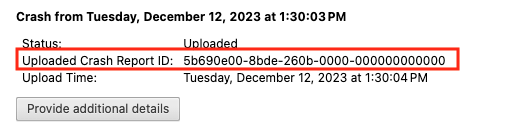
so I just checked brave://crashes to see why this issue hasn’t gotten fixed.

Despite turning on both Usage Pings and Diagnostic Reports, the Brave team has gotten nothing

How can this issue be reproduced?

  1. When certain shorts on YouTube are viewed Brave (Arch Linux, specifically a Steam Deck)

Example: youtube(dot)com/shorts/-XuFCsqZG5E

  1. Playing results in full crash to desktop

Expected result:

The short plays normally

Brave Version( ):

[Brave 1.86.139]

Has been going on since at least November.

Additional Information:

Would like to know how to get Brave to stop reopening EVERY INDIVIDUAL TAB when I reopen it. The browser locks up for 10 minutes while accidentally DoS’ing multiple sites that I visit frequently.

@JLHack7

How do I manually submit crash reports?

https://support.brave.com/hc/en-us/articles/22281484910221-How-do-I-manually-submit-crash-reports

After you click the “Send Now” button, return to brave://crashes and gather up the Crash Report ID numbers that end with a string of zeros. Post the numbers, here, in a new reply. Example of a Crash Report ID number:

@289wk, ahem

I don’t think our users are capable of pulling magic tricks, let alone send crash reports their browser doesn’t have.

@JLHack7 the idea it’s not generating crash reports makes me wonder if something else is going on. It’s certainly weird.

What I would ask for the moment though is if you tried any of the basic kind of troubleshooting things meant to narrow down possible conflicts? For example:

  • If you visit in a Private window, does it still happen?

  • Does it happen with Shields disabled?

  • If you create a secondary profile and use it “as is” without changing settings or adding extensions, does this still occur?

  • Could you try on Brave Beta or Brave Nightly to see if the issue happens there as well?

  • Does it happen just by visiting? Such as if you go to https://www.youtube.com/shorts/-XuFCsqZG5E are you saying it “crashes” right away?
  • Is it a matter of it needing to play the video a bit before it happens?
  • Or does it tend to load and play fine but perhaps crashes when it tries to autoplay the next thing?

Also in with everything mentioned prior, do you notice a difference depending on whether you’re signed into YouTube?

I’ve also been thinking about ways to find the cause, but there are a few issues.

Firstly, when loading such a short, the video loads and starts playing for a bit, then the entire browser hangs for a few seconds and then all browsing windows instantly vanish.

The biggest problem is that if I don’t get rid of the tab that caused it, restoring the previous browsing session will cause it to just crash again.

Fortunately, YouTube’s devs have foresaw potentially issues, so your Browsing History doesn’t change on Shorts that are queued naturally (by scrolling to the next short) until the current short finishes playing. This means that when a Chromium window is restored, the tab remains on the prior (non-crashing) short. I can just close the tab with Ctrl+W.

Unfortunately, when opening a YouTube video from a hyperlink, or from your YouTube watch history, there is no such protection, and the corrupted short will still be present when you restore the previous browsing session, causing another immediate crash.

The only fix is to go to Brave’s Recent Tabs list and reopen each of the previous session’s windows one by one except for the one that caused the crash (which is now permanently unrecoverable)

The biggest obstacle to finding the cause is that, when manually restoring individual windows, Brave will not only reopen all tabs in the window, but also expand all tab groups (which were closed) and actually load all tabs. At the same time.

In my case, this causes my Steam Deck to sh!t itself for a good 10-15 minutes as the 15 tab groups and the 600 tabs within are loaded simultaneously, and several websites to suffer accidental DoS attacks.

I religiously use Chromium’s built in task manager to keep everything in line, but all of the pages are just instantly queued, so I can’t kill the tabs fast enough, because for every tab I kill, another 200 are loaded the next instant.

In order to find the cause, I need a keyboard shortcut I can set to force Brave to just stop what it is doing, then I would have a much easier time finding the root cause, because I wouldn’t risk losing the browsing windows I actually want to preserve from my Recent Tabs history while undertaking the process of repeatedly opening/loading shorts/crashing.

Alternatively, if I have the exact command line for the process that the tabs are run in, I can use Linux’s pkill to kill those specific processes. For example pkill -f “app/brave/brave --type=gpu-process” will kill all of Brave’s GPU processes. Killing the all of the tab processes at once would alleviate this issue.

  • If you visit in a Private window, does it still happen?
  • Does it happen with Shields disabled?

Backed up Brave’s user data folders (Session, Session Storage, Sync, and Web Storage) so I could reload my session.

Then I opened Private Window and opened YouTube, disabled shields, then opened the link I previously mentioned.

Instant crash.

Fortunately, my method of backing up my session does work.

Main point of that one was extensions and/or cookies. So at least doesn’t seem that.

Which does go back to another. If you disable graphics acceleration in settings → system does it change? Basically wondering if it would be fine if it’s just doing the software rendering. If so, then hints graphics card settings or the particular backend being used by Brave.

New profile just would have been a lot of things to default settings and no extensions on it. Still can be helpful but at this point I’m a doubtful.

So idea of it being due to Shields is unlikely. Had been wondering if some particular setting, especially if you added custom filters, might have been causing some conflict.

Disabled graphics acceleration, still crashed.

Yea, this is one of those times where disabling hardware graphics acceleration is going to be a test.

Likewise, if you can for me, as I’m pretty good with GPU stuff, get a snippet from brave://gpu for me (only when graphics acceleration is enabled. Namely, these sections:


(I’m kind of the GPU whisperer around here, but I still recommend @Saoiray’s advice, and if it works, then get the brave://gpu screenshots I desire.)

Nevermind. I wrote this entirely before you posted that.

Nice to know still.

Unfortunately, more bad news.

I backed up Brave’s entire Default data folder, then removed it to wipe all settings and data.

Still crashed on the earlier short.

I also checked brave://crashes after testing on the cleaned version, but there was still no reports listed.

Also, Microsoft Edge on Linux, another Chromium browser, can view the short without crashing, so it’s clearly something specific to Brave.

@JLHack7 can you do the Brave Beta or Brave Nightly test for me?

Not only is this an entirely separate installation, but the version differences also would be notable. If it doesn’t replicate, it might narrow down what happening for the devs. After that feedback, going to try to tag in Mattches and whoever to see if they can help a bit.

edit

Oh, and I also forgot to confirm. Which method from https://brave.com/linux/ did you use to install? I guess trying to figure out if you did Flatpak, Aur, or some other way?

Flatpak, I will try Brave Beta.

Ah, which can have its own little problems sometimes. I’m sure you saw the part it says?

Brave is available as a Flatpak package from Flathub. While it is maintained by Brave Software, it is not yet working as well as our native packages. In addition, it modifies Chromium sandboxing in ways which have not been vetted by the Brave or Chromium security teams. We currently recommend that users who are able to use our official package repositories do so instead of using the Flatpak

I almost wonder if it would work differently if you use the official package rather than the Flatpak?

Anyway, @Mattches @steeven tagging you both on this if can look it over when you’re available. At this point not only why theirs is crashing, but no crash reports sticking around to provide a crash report ID.

Working on Brave beta.

Is it possible that deleting the Default data folder wasn’t enough, and I need to completely delete everything, or is it certainly fixed now?

Also, if Flatpak was an issue, would the fact that I installed the Beta through

paru -S brave-beta-bin

be the reason I’m not having the issue?

I would recommend using the official package rather than flatpak. Also worth noting that

  1. When certain shorts on YouTube are viewed Brave (Arch Linux, specifically a Steam Deck)

the device you’re using Brave on was not tested for – even though it’s technically just a Linux machine there are factors that may not have been accounted for and might cause additional issues.

Lastly – and I can’t believe nobody has mentioned this yet – to stop Brave from reopening the last tabs you had open, go to Settings --> Get started and change the On startup option:

Brave already asks whether or not to open previous tabs instead of doing it automatically. The secondary issue I’m complaining about doesn’t have to do with restoring the previous session normally.

This is because when restoring the previous session normally, Brave will only actually open and load the 50 most recently used tabs, and the remaining 450+ tabs will be inactive until I actually click on them. This means the process of restoring the previous session is very quick, because only 50 tabs actually get opened.

I’m referring to a different problem.

If restoring the previous session would simply cause Brave to crash again, I will instead go to the recent tabs menu and restore each of the previous browser windows one by one, EXCEPT the one that will cause the crash. I have already made a habit of opening YouTube in a separate window, so that my other windows don’t crash.

By reopening only the windows that won’t cause Brave to crash, I can salvage as much of my previous session as possible.

The problem is that when restoring an individual window, Brave doesn’t just reload the window and open the 50 most recent tabs, it opens and loads EVERY SINGLE TAB within that window, all at once. This means all 500+ tabs are loaded and opened simultaneously, causing those websites to experience a DoS attack with hundreds of requests in the span of a single second. This also causes my entire PC to hang for 5-10 minutes until all of the tabs are finished loading.

I need a way to stop this, firstly becase I don’t want to wait 10 minutes for my device to unfreeze, and secondly because I don’t want those websites confuse this accidental DoS attack with a real one and ban me.

Hi,

If you are having issues with YouTube specifically it may pay to try opening from a Private browser window.

If that fails it next would be a good idea to take a look these instructions regarding updating Brave components. These are updated separately from the Brave program and the data is stored in the Brave profile.

The specific URL I am referring to from the instructions linked above is visiting :slight_smile: the URL below in Brave and updating all components in your profile.

brave://components

If that fails you could make a new profile or alternatively install start-private-browser and start a new session and new profile.

Hope that first component update step works let me know how you get on.