Description of the issue: How can this issue be reproduced?
Expected result:
Brave Version( check About Brave):
Mobile Device details
Additional Information:
I have the same issue since this morning, I have a note 10 also working on Android 11, tabs are visible minimized only
1 Like
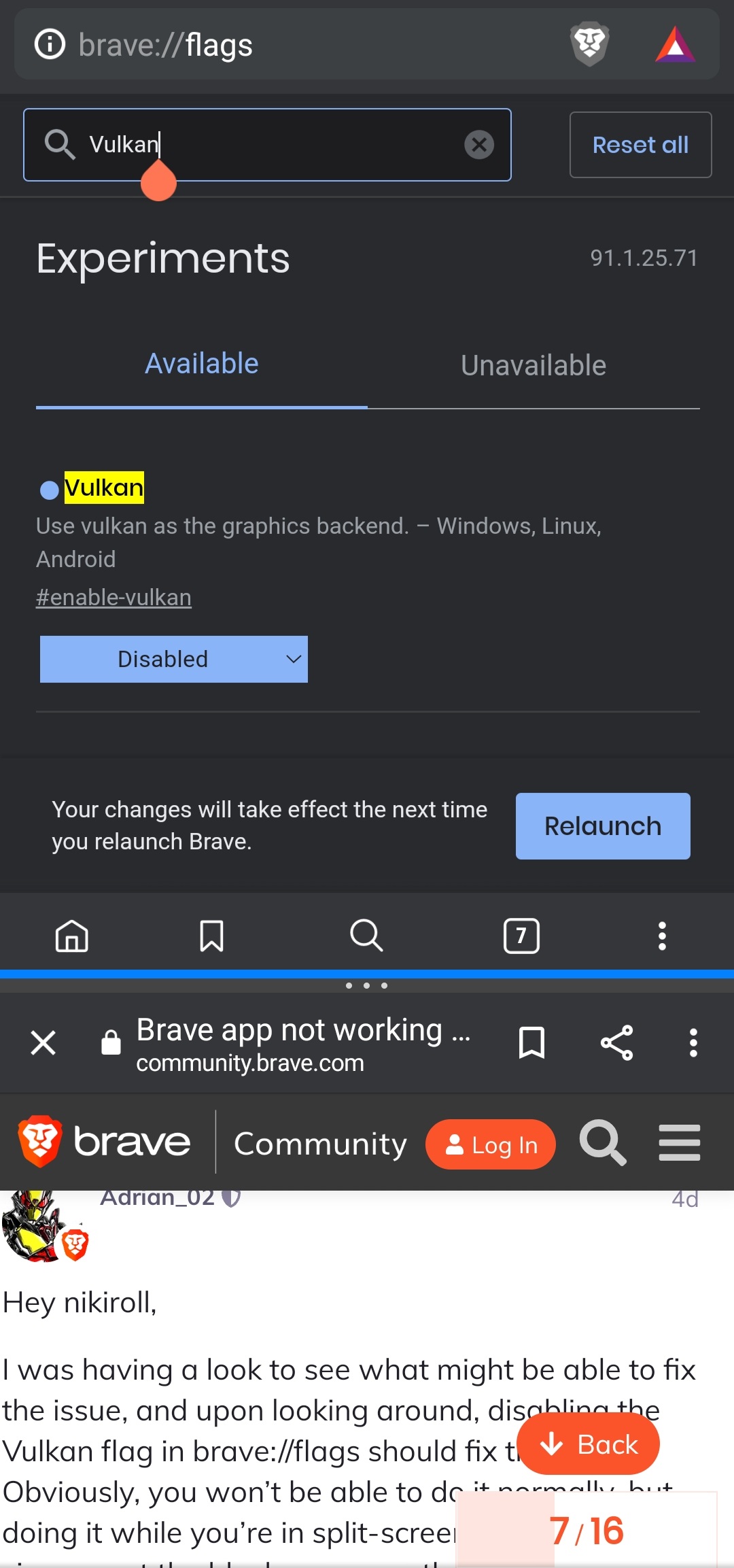
Your issue has popped up at a crazy rate lately… You’ll need to do some split-screen mode and turn off the vulkan flag in brave://flags…
Description of the issue:
For the past 2 days, Brave hasn’t been working properly for me. I can still search using the search bar, but I cannot see the results. What covers the results is a black screen. Even if I minimize the tab, I cannot see the buttons or options.
How can this issue be reproduced? N/A
Expected result: N/A
Brave Version( check About Brave): Brave 1.25.71, Chromium 91.0.4472.88
Mobile Device details Android 11; Build/RP1A.200720.012
Additional Information:
I have alread…
3 Likes
It works!!! Thanks @megaspaz
1 Like
Unfortunately I’m having the same issue on my Samsung Note 10Lite and it’s also black in split screen or pop out mode.
1 Like
Warco
June 12, 2021, 2:58pm
6
I have the same issue but how can we get to brave://flags, the screen is black, impossible to do anything. I made it on Brave on my computer. Vulkan, disabled ou enabled, not working. So sad, I have to use back Firefox
1 Like
Thank you I managed to disable that vulkan setting by touching the screen as if I wanted to select a text and then the screen appeared again. Thank you!
1 Like
Warco
June 13, 2021, 2:27pm
8
Yes, it works for me as well, thx !! I didn’t understand at the beginning we had to write vulkan in the black screen and search desable it and watching if we are at the good place in a little windows. Great, thank you !
Im just gonna leave this screenshot here so it is easy for people to picture the solution if anyone comes across it again.
First thing to do is put Brave into split-screen mode. In the above Screenshot, Brave browser is open in the top half and Chrome is in the bottom half
Open up brave://flags through the Brave Browser address bar. A black screen will open.
Touch the top-middle of the Black screen and your keyboard will pop up. Screen will still be black.
Type in Vulkan and press enter. Screen will still be black
Touch the top part of the black screen again (where the search bar is) and you will finally see the same page as the screenshot.
Change the blue drop down menu from Default to Disabled.
Press the relaunch button.
Welcome back to the light!
Hey man. See the post here. It should help you to picture the solution.
Im just gonna leave this screenshot here so it is easy for people to picture the solution if anyone comes across it again.
[Screenshot_20210614-204656_Brave]
First thing to do is put Brave into split-screen mode. In the above Screenshot, Brave browser is open in the top half and Chrome is in the bottom half
Open up brave://flags through the Brave Browser address bar. A black screen will open.
Touch the top-middle of the Black screen and your keyboard will pop up. Screen will still be …
I have been put brave into a split-screen but it doesn’s working
system
July 23, 2021, 6:44pm
13
This topic was automatically closed 30 days after the last reply. New replies are no longer allowed.


 Do we have to wait the update ?