Latest update locks up on Brave launch


Description of the issue:
How can this issue be reproduced?

  1. Start Ubuntu 24.04 LTS

  2. Launch Brave

Expected result: Expected result is, Brave works normally. What happens however is almost immediately after it appears on the screen, the entire system locks up. The only fix is a hard reboot.

Brave Version( check About Brave): Doesn’t stay up long enough to check.

Additional Information: I tried (based on some other threads here) running it with this command: brave-browser –disable-features=WaylandWpColorManagerV1 but that didn’t work. It did start, the shields and news blocks at the bottom started moving around, but the browser soon locked up the entire system.

Note this same lockup issue occurs when using Ungoogled Chromium.

@scottsmsgs4we9cjv1

Take a look at

https://askubuntu.com/questions/1402530/running-any-chromium-based-browser-in-ubuntu-22-04-freezes

I read that but I’m not sure there’s anything there that is helpful. For one thing, the browser doesn’t stay up long enough (before locking up the entire PC) for me to go into settings and try disabling hardware acceleration.

Since this lockup problem occurs on Ungoogled Chromium I assume it’s something in the base chromium code rather than Brave’s own code?

Just ran today’s (10-30-2025) update to 1.84.132 and it still does the same thing. The shields and news tiles at the bottom of the screen flash for a bit. As soon as I hit OK to the “Restore tabs?” button, the browser immediately locks up and I have to hard-power-off the PC.

@scottsmsgs4we9cjv1

In order to know which of the command line character strings to use, in a Brave Browser New Window, go to: brave://version and look for Command Line:

Usually, in a Linux OS command line, you can start Brave Browser with one of the following commands:

brave -n --args --incognito --no-experiments --disable-extensions --disable-gpu --enable-leak-detection --crash-on-failure 2> $HOME/Desktop/brave_console_out.txt

or

brave-browser -n --args --incognito --no-experiments --disable-extensions --disable-gpu --enable-leak-detection --crash-on-failure 2> $HOME/Desktop/brave_console_out.txt

Those 2 command line character strings are the same, except for the leading brave vs brave-browser

For the command line character string, the switches are intended to:

  • Start up Brave Browser, showing a New Private Window [--incognito]
  • Disable all experiments at brave://flags [--no-experiments]
  • Disable extensions [--disable-extensions]
  • Disable hardware (GPU) ie Graphic Acceleration [--disable-gpu]
  • Enable leak detection and if that failure occurs, then crash the browser [--enable-leak-detection --crash-on-failure are a combo]
  • Produce error/log output to a file named ‘brave_console_out.txt’ on the Desktop

How do I manually submit crash reports?

https://support.brave.com/hc/en-us/articles/22281484910221-How-do-I-manually-submit-crash-reports

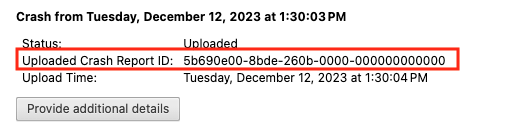
After you click the “Send Now” button, return to brave://crashes and gather up the Crash Report ID numbers that end with a string of zeros. Post the numbers, here, in a new reply. Example of a Crash Report ID number:
"

This topic was automatically closed 30 days after the last reply. New replies are no longer allowed.