After a system update (along with brave) yesterday, now when watching a youtube video, it almost always crashes if I click on the progress bar. How can this issue be reproduced?
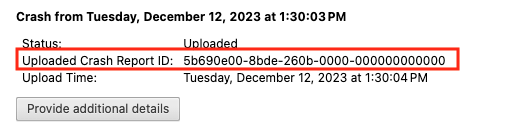
After you click the “Send Now” button, return to brave://crashes and gather up the Crash Report ID numbers that end with a string of zeros. Post the numbers, here, in a new reply. Example of a Crash Report ID number:
Within this directory, you will find subdirectories such as pending (for unsent reports) and attachments. For more detailed system-level crash data, you can also check systemd-coredump by running coredumpctl list brave in the terminal, or view recent kernel messages with dmesg -T | tail -100.
You didn’t mention the distro you’re using … and which type of Brave install you’re using.
Also, you stated “tool bar” in the Title and “progress bar” in the post. Those are two different components. Yea, you might have issues with both, but better to be explicit.
.
.
I tested with these Brave versions (I primarily use Beta):
These are native installs, using dedicated Brave repos.
(i.e., I do NOT use Flatpak, Snap, etc).
I am using openSUSE Leap (Linux, obviously).
.
I have no issues using the YT Progress Bar (among the other bars).
As shown in screenshot, I clicked the bar to instantly move to various time locations; plus sliding the Playhead to other time locations.
.
.
It is the progress bar that always crashes youtube. But sometimes without touching the progress bar it still crashes after some watching time.
This crash behavior doesn’t happen in the first 20 secs or so, meaning you can move the progress bar safely in the first 20 secs of watching a new youtube video. If you click on a new youtube video (without crashing the first one), this 20 secs rule refreshes, meaning moving progress bar doesn’t crash in the first 20 secs on a new video.
I have a few other brave profiles and this youtube crash behavior doesn’t appear in those profiles.
The crash behavior still happens after disabling all youtube related extensions and restart.
So far I’ve tried cleaning cache of the browser but it doesn’t help.
I tried to see the crash report files under ~/.config/Brave… but they seem to be encrypted so I’m not sure what I’m sending