### Description
User has reported seeing the browser crash when the use/click on… certain toolbar elements (extensions toolbar icon), when editing a bookmark, or using certain keyboard shortcuts. The browser appears to run fine other than in those specific cases.
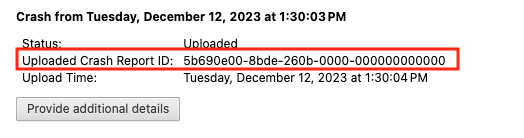
I've asked the user to submit newer crash report IDs for each of the above actions that cause a crash.
**OS/Browser version:** macOS Tahoe 26.6.2, Brave 1.95.101 - 1.96.61
<details>
<summary>Crash report IDs</summary>
[Will add more as user provides them]
```
ebfe0c00-c4b6-5710-0000-000000000000
```
</details>
<details>
<summary>Callstack for ebfe0c00-c4b6-5710-0000-000000000000
</summary>
```
[ 00 ] commands::AcceleratorMenuCoordinatorMac::ObjCStorage::EnsureIndexed()::'lambda'(NSMenuItem*)::operator()(NSMenuItem*) const ( immediate_crash.h:180 )
[ 01 ] std::__Cr::__invoke_result_impl<void, commands::AcceleratorMenuCoordinatorMac::ObjCStorage::EnsureIndexed()::'lambda'(NSMenuItem*) const&, NSMenuItem* __strong>::type std::__Cr::__invoke[abi:sqn240000]<commands::AcceleratorMenuCoordinatorMac::ObjCStorage::EnsureIndexed()::'lambda'(NSMenuItem*) const&, NSMenuItem* __strong>(commands::AcceleratorMenuCoordinatorMac::ObjCStorage::EnsureIndexed()::'lambda'(NSMenuItem*) const&, NSMenuItem* __strong&&) ( invoke.h:90 )
[ 02 ] std::__Cr::__invoke_result_impl<void, commands::AcceleratorMenuCoordinatorMac::ObjCStorage::EnsureIndexed()::'lambda'(NSMenuItem*) const&, NSMenuItem* __strong>::type std::__Cr::invoke[abi:sqn240000]<commands::AcceleratorMenuCoordinatorMac::ObjCStorage::EnsureIndexed()::'lambda'(NSMenuItem*) const&, NSMenuItem* __strong>(commands::AcceleratorMenuCoordinatorMac::ObjCStorage::EnsureIndexed()::'lambda'(NSMenuItem*) const&, NSMenuItem* __strong&&) ( invoke.h:29 )
[ 03 ] void absl::functional_internal::InvokeObject<commands::AcceleratorMenuCoordinatorMac::ObjCStorage::EnsureIndexed()::'lambda'(NSMenuItem*) const&, void, NSMenuItem* __strong>(absl::functional_internal::VoidPtr, absl::functional_internal::ForwardT<NSMenuItem* __strong>::type) ( function_ref.h:74 )
[ 04 ] commands::AcceleratorMenuCoordinatorMac::ObjCStorage::EnsureIndexed()::'lambda'(NSMenuItem*)::operator()(NSMenuItem*) const ( accelerator_menu_coordinator_mac.mm:114 )
[ 05 ] std::__Cr::__invoke_result_impl<void, commands::AcceleratorMenuCoordinatorMac::ObjCStorage::EnsureIndexed()::'lambda'(NSMenuItem*) const&, NSMenuItem* __strong>::type std::__Cr::__invoke[abi:sqn240000]<commands::AcceleratorMenuCoordinatorMac::ObjCStorage::EnsureIndexed()::'lambda'(NSMenuItem*) const&, NSMenuItem* __strong>(commands::AcceleratorMenuCoordinatorMac::ObjCStorage::EnsureIndexed()::'lambda'(NSMenuItem*) const&, NSMenuItem* __strong&&) ( invoke.h:90 )
[ 06 ] std::__Cr::__invoke_result_impl<void, commands::AcceleratorMenuCoordinatorMac::ObjCStorage::EnsureIndexed()::'lambda'(NSMenuItem*) const&, NSMenuItem* __strong>::type std::__Cr::invoke[abi:sqn240000]<commands::AcceleratorMenuCoordinatorMac::ObjCStorage::EnsureIndexed()::'lambda'(NSMenuItem*) const&, NSMenuItem* __strong>(commands::AcceleratorMenuCoordinatorMac::ObjCStorage::EnsureIndexed()::'lambda'(NSMenuItem*) const&, NSMenuItem* __strong&&) ( invoke.h:29 )
[ 07 ] void absl::functional_internal::InvokeObject<commands::AcceleratorMenuCoordinatorMac::ObjCStorage::EnsureIndexed()::'lambda'(NSMenuItem*) const&, void, NSMenuItem* __strong>(absl::functional_internal::VoidPtr, absl::functional_internal::ForwardT<NSMenuItem* __strong>::type) ( function_ref.h:74 )
[ 08 ] absl::FunctionRef<void (NSMenuItem*)>::operator()(NSMenuItem*) const ( function_ref.h:165 )
[ 09 ] base::FunctionRef<void (NSMenuItem*)>::operator()(NSMenuItem*) const ( function_ref.h:123 )
[ 10 ] commands::ForEachMenuItem(NSMenu*, base::FunctionRef<void (NSMenuItem*)>) ( default_accelerators_mac.mm:276 )
[ 11 ] commands::ForEachMenuItem(NSMenu*, base::FunctionRef<void (NSMenuItem*)>) ( default_accelerators_mac.mm:280 )
[ 12 ] commands::AcceleratorMenuCoordinatorMac::ObjCStorage::EnsureIndexed() ( accelerator_menu_coordinator_mac.mm:96 )
[ 13 ] commands::AcceleratorMenuCoordinatorMac::ObjCStorage::FindPristineItem(int) ( accelerator_menu_coordinator_mac.mm:73 )
[ 14 ] commands::AcceleratorMenuCoordinatorMac::SyncCommand(int) ( accelerator_menu_coordinator_mac.mm:188 )
[ 15 ] commands::AcceleratorMenuCoordinatorMac::OnAcceleratorsChanged(base::flat_map<int, std::__Cr::vector<ui::Accelerator, std::__Cr::allocator<ui::Accelerator>>, std::__Cr::less<void>, std::__Cr::vector<std::__Cr::pair<int, std::__Cr::vector<ui::Accelerator, std::__Cr::allocator<ui::Accelerator>>>, std::__Cr::allocator<std::__Cr::pair<int, std::__Cr::vector<ui::Accelerator, std::__Cr::allocator<ui::Accelerator>>>>>> const&) ( accelerator_menu_coordinator_mac.mm:166 )
[ 16 ] non-virtual thunk to commands::AcceleratorMenuCoordinatorMac::OnAcceleratorsChanged(base::flat_map<int, std::__Cr::vector<ui::Accelerator, std::__Cr::allocator<ui::Accelerator>>, std::__Cr::less<void>, std::__Cr::vector<std::__Cr::pair<int, std::__Cr::vector<ui::Accelerator, std::__Cr::allocator<ui::Accelerator>>>, std::__Cr::allocator<std::__Cr::pair<int, std::__Cr::vector<ui::Accelerator, std::__Cr::allocator<ui::Accelerator>>>>>> const&) ( accelerator_menu_coordinator_mac.mm:0 )
[ 17 ] commands::AcceleratorService::AddObserver(commands::AcceleratorService::Observer*) ( accelerator_service.cc:327 )
[ 18 ] BrowserManagerService::OnBrowserActivated(BrowserWindowInterface*) ( browser_manager_service.cc:253 )
[ 19 ] base::RepeatingCallback<void (BrowserWindowInterface*)>::Run(BrowserWindowInterface*) const & ( callback.h:346 )
[ 20 ] void base::RepeatingCallbackList<void (BrowserWindowInterface*)>::RunCallback<BrowserWindowInterface*&>(std::__Cr::__list_iterator<base::RepeatingCallback<void (BrowserWindowInterface*)>, void*>, BrowserWindowInterface*&) ( callback_list.h:382 )
[ 21 ] void base::internal::CallbackListBase<base::RepeatingCallbackList<void (BrowserWindowInterface*)>>::Notify<BrowserWindowInterface*>(BrowserWindowInterface*&&) ( callback_list.h:229 )
[ 22 ] BrowserActiveStateManager::DidBecomeActive() ( browser_active_state_manager.cc:55 )
[ 23 ] BrowserView::PaintAsActiveChanged() ( browser_view.cc:6010 )
[ 24 ] base::RepeatingCallback<void ()>::Run() const & ( callback.h:346 )
[ 25 ] void base::RepeatingCallbackList<void ()>::RunCallback<>(std::__Cr::__list_iterator<base::RepeatingCallback<void ()>, void*>) ( callback_list.h:382 )
[ 26 ] void base::internal::CallbackListBase<base::RepeatingCallbackList<void ()>>::Notify<>() ( callback_list.h:229 )
[ 27 ] views::Widget::NotifyPaintAsActiveChanged() ( widget.cc:1891 )
[ 28 ] views::Widget::NotifyPaintAsActiveChanged() ( widget.cc:1891 )
[ 29 ] views::Widget::LockPaintAsActive() ( widget.cc:1839 )
[ 30 ] views::Widget::OnNativeWidgetActivationChanged(bool) ( widget.cc:2062 )
[ 31 ] views::NativeWidgetMac::OnWindowKeyStatusChanged(bool, bool) ( native_widget_mac.mm:183 )
[ 32 ] remote_cocoa::NativeWidgetNSWindowBridge::OnWindowKeyStatusChangedTo(bool) ( native_widget_ns_window_bridge.mm:1524 )
[ 33 ] -[ViewsNSWindowDelegate windowDidBecomeKey:] ( views_nswindow_delegate.mm:263 )
[ 34 ] 0x185abd9e8 ( CoreFoundation )
[ 35 ] 0x185b4a0b8 ( CoreFoundation )
[ 36 ] 0x185b49ffc ( CoreFoundation )
[ 37 ] 0x185a8c404 ( CoreFoundation )
[ 38 ] 0x1872c34a0 ( Foundation )
[ 39 ] 0x18a04822c ( AppKit )
[ 40 ] 0x189ff40c0 ( AppKit )
[ 41 ] 0x18a0938c4 ( AppKit )
[ 42 ] 0x18a022220 ( AppKit )
[ 43 ] 0x18a021e90 ( AppKit )
[ 44 ] -[NativeWidgetMacNSWindow sendEvent:] ( native_widget_mac_nswindow.mm:707 )
[ 45 ] 0x18aa924c4 ( AppKit )
[ 46 ] __34-[BrowserCrApplication sendEvent:]_block_invoke ( chrome_browser_application_mac.mm:377 )
[ 47 ] base::apple::CallWithEHFrame(void () block_pointer) ( Brave Browser Framework )
[ 48 ] 0x18a6df6d4 ( AppKit )
[ 49 ] 0x18a6df6d4 ( AppKit )
[ 50 ] 0x189ef1160 ( AppKit )
[ 51 ] base::MessagePumpNSApplication::DoRun(base::MessagePump::Delegate*) ( message_pump_apple.mm:788 )
[ 52 ] base::MessagePumpCFRunLoopBase::Run(base::MessagePump::Delegate*) ( message_pump_apple.mm:106 )
[ 53 ] base::sequence_manager::internal::ThreadControllerWithMessagePumpImpl::Run(bool, base::TimeDelta) ( thread_controller_with_message_pump_impl.cc:656 )
[ 54 ] non-virtual thunk to base::sequence_manager::internal::ThreadControllerWithMessagePumpImpl::Run(bool, base::TimeDelta) ( run_loop.cc:0 )
[ 55 ] base::RunLoop::Run(base::Location const&) ( run_loop.cc:135 )
[ 56 ] content::BrowserMainRunnerImpl::Run() ( browser_main_runner_impl.cc:148 )
[ 57 ] content::BrowserMain(content::MainFunctionParams) ( browser_main.cc:32 )
[ 58 ] content::RunBrowserProcessMain(content::MainFunctionParams, content::ContentMainDelegate*) ( content_main_runner_impl.cc:708 )
[ 59 ] content::ContentMainRunnerImpl::RunBrowser(content::MainFunctionParams, bool) ( content_main_runner_impl.cc:1350 )
[ 60 ] content::ContentMainRunnerImpl::Run() ( content_main_runner_impl.cc:1174 )
[ 61 ] content::RunContentProcess(content::ContentMainParams, content::ContentMainRunner*) ( content_main.cc:337 )
[ 62 ] content::ContentMain(content::ContentMainParams) ( content_main.cc:350 )
[ 63 ] content::RunContentProcess(content::ContentMainParams, content::ContentMainRunner*) ( content_main.cc:337 )
[ 64 ] content::ContentMain(content::ContentMainParams) ( content_main.cc:350 )
[ 65 ] ChromeMain ( chrome_main.cc:224 )
[ 66 ] main ( chrome_exe_main_mac.cc:222 )
```
</details>
User thread: https://community.brave.app/t/latest-brave-crashes-on-macos/658302/12