So, if I do not respond within 24 hours of receiving the message, I will not receive a response for another 3-4 days.
Absolutely and utterly useless!
at least 20 characters woohoo…
The Kiwi is the worst. Thank goodness he’s not woking a crisis hotline. People like him are why everyone is busy trying to learn what gaslighting means. Regardless of his incessant deflections & redirections, there’s a real issue with the Brave Browser in this matter & they’re not fixing it.
i think they have finally identified the bug, and testing is in process. Hoping that they will come up with a solution soon!!
If we (the team) cannot reproduce the issue or don’t see that it’s particularly widespread, then we have to rely on the reports in which users are experiencing the issue to diagnose it. Whatever the issue is, it can’t “just be fixed” because we have no way of knowing what needs to be fixed.
For those of you who are willing, here is some useful information/tests that you can provide that will help us determine might be causing the performance issue:
- What Operating System and OS version are you using, as well as what Brave version?
- When did this issue occur? Was it recently after a specific update or has it been occurring for a while now?
- Have you tried disabling
Graphics Accelerationin the browser (Settings --> System --> Graphics acceleration)? - Have you tried testing the browsers performance in a fresh profile? How does it compare?
- How does Brave’s performance stack up to another [ideally Chromium-based] browser under the same conditions?
- If you download Brave Beta (which will install as a separate browser and will not overwrite anything), does it also show the same performance issues?
Thank you
-
MacOS Sonoma Version 14.4.1 (23E224), Brave v 1.65.130
-
The issue started maybe 3 weeks back. It certainly started after an update which came somewhere 4 weeks back as far as i remember.
-
Well for the Hardware Acceleration, i cant see any setting like that in my setting. Asked my friend also if he could se it, but this setting is not visible to him as well. Attaching a screenshot below for the same.
-
Yes i tried in a Fresh Profile. Doesnt change anything. Tried in Private Window, tried in my original profile, tried in new profile, no change.
-
Didn’t quite understand your question over here @Mattches. Would be great if you could just explain it once.
-
Yes, i tried with Brave Beta as well, no difference. The issue persists

Well i am really Sorry for my previous rude replies and responses. Definitely things should have been handled politely at an early stage itself, yet i am glad that we guys have patched up on another thread and are looking forward to resolve the issue. Currently he asked me for some other things and he is doing some testing in Chrome to look for any upstream Issue!!!
@deadlymaddy06 appreciate the response. I’ve forwarded your information to the team for review.
Also I made an edit in my previous post — I’m used to calling it Hardware acceleration but the terminology is now “graphics acceleration” and is the second toggle option in the screenshot you shared. It’s been known to cause all sorts of weird issues, including (but not limited to) performance issues. Definitely worth trying to toggle it off and see if the issue persists.
 Basically, I was asking if other browsers on your system perform normally — namely browsers that use the Chromium engine, such as Chrome and Chromium (obviously), MS Edge, Vivaldi, Opera, etc. This is helpful because if Chrome (for example) also exhibited the same performance issues, then this may point to the issue being rooted in the underlying Chromium engine itself (rather than Brave specifically).
Ohkk  , i’ll turn it off and see if the issue persists.
Well i havent tried it in Chrome/Chromium as of now!! But will do the same in coming days and update if the issue persists there also. Thanks 
Hey Matchsticks, I see you diplomatically covering for the Kiwi, but the truth is there have been a plethora of threads created around this issue & yet his default response is always to come at it as if there is no issue & we’re doing something wrong… Nobu. That’s what’s truly irksome.
I’m not bothering to create an account and log in to complain for my health. The Italian Open is happening & I’ve got tennis to watch. If I’m here and saying something it’s for good reason.
We already told y’all many times something is rotten in the state of Bravemark, so at a certain point it’s time to look within the group & say metaphysical conceits aside just because we can’t find or see it immediately, doesn’t mean the problem doesn’t exist.
Chaka, Ain’t Nobody messing around with Graphics Acceleration. Let It Go, Elsa. Most people (at least with MacOS) are not sitting here saying to themselves you know what I must do before watching a random video? Mess with Graphics Acceleration!
That’s some PC mess where users love to over-customize everything & then wonder why they’re having issues. Most are just trying to “set it & forget it” with rollout readymade pret-a-tech, so spare us the deep dive tech jargon whenever possible.
People have already said it’s this specific browser giving them issues. It’s not happening in others just Cowardly. Glad the issue is being escalated.
Also having this issue, it’s brutal. I’ve got 25 gig ram unused getting crushed by a single livestreaming tab. Hardware acceleration did not change anything.
@Mattches any success?? 
Now Instagram is also consuming 1GB Memory just while chatting with someone.
I’ve encountered a similar situation, I’ve tried all the solutions but none have been effective. When I use different browsers, nothing happens.
@deadlymaddy06 can you tell me if you have any saved tab groups by chance when you see this issue?
Well i dont use tab groups at all if it is what you are asking @Mattches
Any updates on the issue?? Memory usage causes the browser to lag overall and restart the webpage or the browser!! It gets frustrating at times
@deadlymaddy06 or anyone else here still encountering this issue, can you please provide screenshots of the browser using the amount of memory described?
You can do this by simply hovering over the relevant tabs and showing the memory usage in the tooltip, like so:

Or you can show it via the browser task manager (in Brave, go to Menu --> More tools --> Task manager):
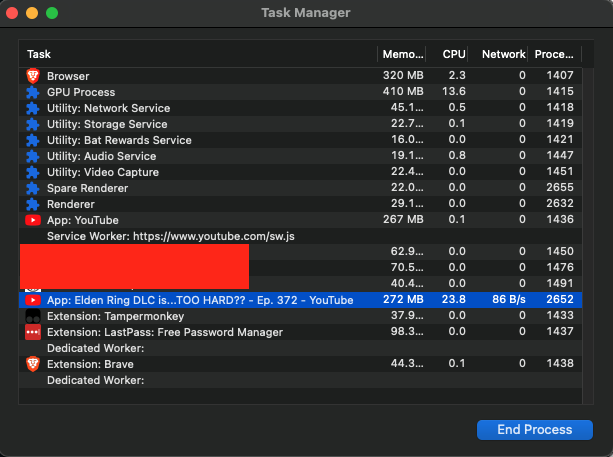
I’d like to add them to the issue I’ve opened on our Github:
Thank you

Mattchsticks, how do we get Memory Usage to appear when hovering over the tab? It doesn’t show for me & I don’t feel like digging for data per your second option. EDIT: It’s CARD w/ PREVIEW in Settings.

Again, my high memory usage issue (which subsequently sends my computer fan into overdrive) happens specifically when watching live streams & when trying to use the live chat feature on Youtube. If I’m just watching a video or have a bunch of tab opens, I’m fine in terms of no fan noise.


So I tested again and both of the usage you have shared here seemed within the normal realm of livestream tabs. On my end, I saw 506 MB and 536 MB data appear on two separate devices for two different live streams. The memory usage has not increased from there waiting for ~half an hour.
I then turned on another YT video (not live) and saw 673 MB used. I tried a few more videos and they were all in the 600-700 MB range. So there is something going on with the cache/data handling for Youtube but I’m not sure what it is.
If anyone here experiencing this issue can also share their architecture and macOS version that would be helpful as well (@deadlymaddy06 I have yours already).


