Description of the issue:
When trying to play any title on HBO Max, I get the following error: “Can’t play content on this browser version. It looks like you’re using an older browser. Update your browser or watch on another supported device.”
Steps to Reproduce:
Open Brave Browser (version 1.80.120) on Windows 11.
@Hhero I believe I know what you’re dealing with. Just to confirm, if you go to brave://components and try to update things there, particularly Widevine Content Decryption Module, do you get an update error?
If the answer to the components is that you do have an error, then follow instructions from one of the two choices below. But if no issues on updating, then ignore this.
The solution will be to go in and rearrange the permissions or to do a clean reinstallation of Brave, whichever you think is easier.
Most efficient solution (though many get confused on instructions)
If you go for the clean reinstallation, which is “easier” but also more annoying, then you will want to export bookmarks and passwords so you don’t lose them. Or at least have a good sync chain with another device.
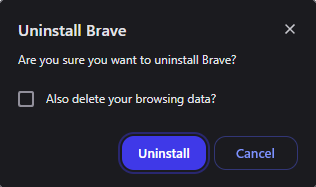
When you uninstall Brave, check the box to delete the data, which you’ll see in a pop-up like below (in the screenshot it’s not checked, but make sure it’s marked).
Doing this would completely remove all data related to Brave, as if you had never installed it on your device. Then go install again. Import your passwords and bookmarks, then things should work wonderfully again.
@Hhero of course your issue is going to be something different. Then I guess back to the drawing board. I don’t have an HBO Max subscription and don’t feel like paying for one to test on this. So going to have to ask you to check on a few things. First, let me confirm:
When you did the new profile, you did create a second one and used it “as is”, right? No extensions or anything? All you did was turn on Widevine?
If you go to brave://settings/shields/filters and in the Create custom filters area, enter hbomax.com/##+js(brave-fix) and then hit Save Changes. Then navigate to HBO Max and try, do you notice any changes?
Actually, you may be able to download and install Brave on top of your current. Without uninstalling just download and install. It could potentially repair whatever is broken. Nothing would be lost in this, so safe option so long as you’re not uninstalling.