It works great on the Android App, on chrome, on Edge and even on Brave but with my secondary profile (work) and in invite profile.
I don’t seem to have anything in my uber security settings that could block login.
How can this issue be reproduced?
1.Unfortunately, I have no idea.
Expected result:
I can login no matter the profile used
I suspected cookies and extensions too so I tried to disable all extensions (not uninstalling though) and I cleared cookies and session/local data via the devTools (Application tab)
It works on private windows from my main profile yes.
@Etshy if it’s working in private window then it guarantees it’s extensions or cookies. Since you have said you disabled extensions and it still had the issues, I’m going to assume it’s cookies. I understand you tried one method to clear and it didn’t seem to work. But let’s try with these two methods:
Site Data only:
Click the icon in the address bar → Cookies and Site Data → Manage on-device data. From there you should see like below, where you can hit the trash can on everything. Once the page is refreshed it should be good if the issue is just with the cookies/data showing there.
If that doesn’t work, it may have some dependence related to the login methods, such as with Google. Even though this step is highly annoying because you’ll be logged out of everything, it will at least purge it out.
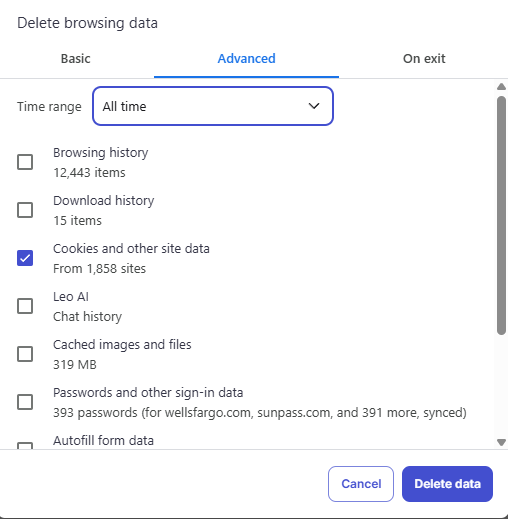
Hamburger menu (three line menu) → Delete browsing data → on Basic or Advanced tab go to All Time for the time range → Check the box for Cookies and other site data → Delete Data button

 icon in the address bar →
 →
→