I have gone through the troubleshooting steps and they do not work. Why can I not access my Microsoft OneDrive account?
Have you checked Brave Shield to make sure it isn’t blocking scripts, or things necessary to allow OneDrive to work properly? That or an extension/add-on that are blocking it, or perhaps a VPN/proxy connection that you are using, blocking necessary scripts or URLs that are necessary for it to work.
You may have to reset back to default settings if you can’t figure it out, and then be careful of what settings you change, that it doesn’t break sites that you use.
You can click on the Brave icon in the address/URL bar and check Brave Shield and also check the settings in settings and be sure that it is allowing scripts to run etc. Perhaps whitelist live.com, Microsoft.com, and outlook.com so your Microsoft services work properly.
Hopefully this will help you figure it out 
Tried it all. Useless. I am not technical with this stuff. I am in the insurance business. This is not user friendly. I go to Shields Down and still nothing. I am not on a VPN. I use Norton and this doesn’t work even when I disable Norton. Do you work for Brave or are you just a community participant. Where is the toggle that I can select which says I trust this web site. Stop blocking it.
Please edit your Original Post (“OP”) above, in order to include:
- Brave Browser version numbers
- Operating System version numbers
You can retrieve the Brave Browser version numbers by using a Brave Browser New Window and going to brave://version/ - example:

I am another Brave Community participant.
The status of your using Microsoft Edge browser, to access your Microsoft account and OneDrive?
Can you supply screenshots of the sign-on windows - where the access / connection proceedings fail? Any ERR . . . blah blah message pop-ups?
Try clearing cookies and cache, in a Brave Browser New Window at brave://settings/clearBrowserData (notice the Time range setting: All time)

Click the Delete data button. Exit / Quit everything and restart. Then test.
Technical stuff, if you want to take a swing at it
In general, the objective is to do a limited reset of Brave Browser settings for the Microsoft Eco-System.
In a Brave Browser New Window, go to ‘https://azure.microsoft.com/’ and click on the tune icon

that is immediately to the left, of the left end, of the URL address field. In the pop-down menu, click the Reset permissions button. Reload the page.
Repeat those steps for:
- 'https://login.microsoftonline.com/
- ‘https://m365.cloud.microsoft/’
- ‘https://teams.live.com/’
- ‘https://www.azureedge.net/’
- ‘https://www.bing.com/’
- ‘https://www.hotmail.com/’
- ‘https://www.microsoft.com/’
- ‘https://www.microsoft365.com/’
- ‘https://www.msn.com/’
- ‘https://www.office.com/’
In a Brave Browser New Window, go to brave://settings/clearBrowserData, select the Basic tab, select All time for Time range, Enable both Cookies and other site data and Cached images and files . . . then click the Delete data button.
Exit / Quit everything and Restart.
Revisit all of those Microsoft Eco-System URL addresses, and for each, click the tune button, and either Enable JavaScript or verify that JavaScript is Enabled, and Reload.
Also be sure to NOT BLOCK the following domains / hostnames:
[*.]akadns.net[*.]akamaized.net[*.]azure.com[*.]azureedge.net[*.]azurewebsites.net[*.]bing.com[*.]bx-msedge.net[*.]cloud.microsoft[*.]gfx.ms[*.]hotmail.com[*.]live.com[*.]microsoft.com[*.]microsoft.net[*.]microsoft365.com[*.]microsoftonline.com[*.]msauth.net[*.]msftauth.net[*.]msn.com[*.]office.com[*.]office.net[*.]outlook.com[*.]s-microsoft.com[*.]shared.global.fastly.net[*.]skype.com[*.]windows.net
Make sure that Upgrade connections to HTTPS at brave://settings/shields is set to Standard:

See later reply, here:
‘Cannot Access Microsoft OneDrive - #6 by oliveirarennan’
Related issue - See: ‘Brave browser on my laptop refuses to let me sign in to my onedrive - #14 by RJRon’
I can reproduce this, I get “[object Object]”, but not with Edge or Chromium. You can see that shields were off for this. I’d also like to point that my cookies were just recently flushed actually so there shouldn’t be any interfering cookie, I had yet to sign back into a single Microsoft site actually (or visit one for that matter).
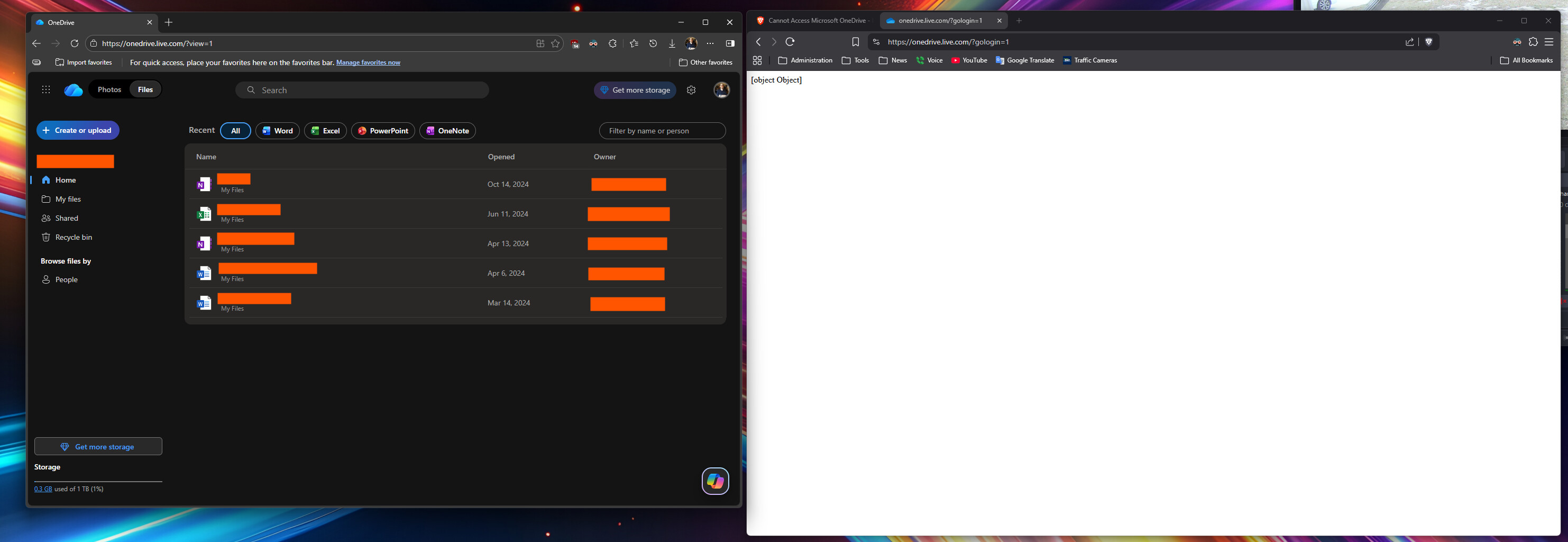
I must say though, I was in OneDrive just a month ago on Brave and it did work then. This is on version Brave 1.85.118.
Chromium test (since the last screenshot didn’t have Chromium in it):

Hello. I had the same problem. After some research, I found a fix that worked for me.
Go to: brave://settings/content/all Delete all content related to: microsoft.com, login.live.com, onedrive.live.com. You will need to log in to your account again.
The fix was originally posted on: https://www.reddit.com/r/brave_browser/comments/1lj48g6/ok_seriously_fixed_the_onedrive_connection_problem/
2 Likes
post from oliveirarennan worked for me, thanks!
This topic was automatically closed 30 days after the last reply. New replies are no longer allowed.