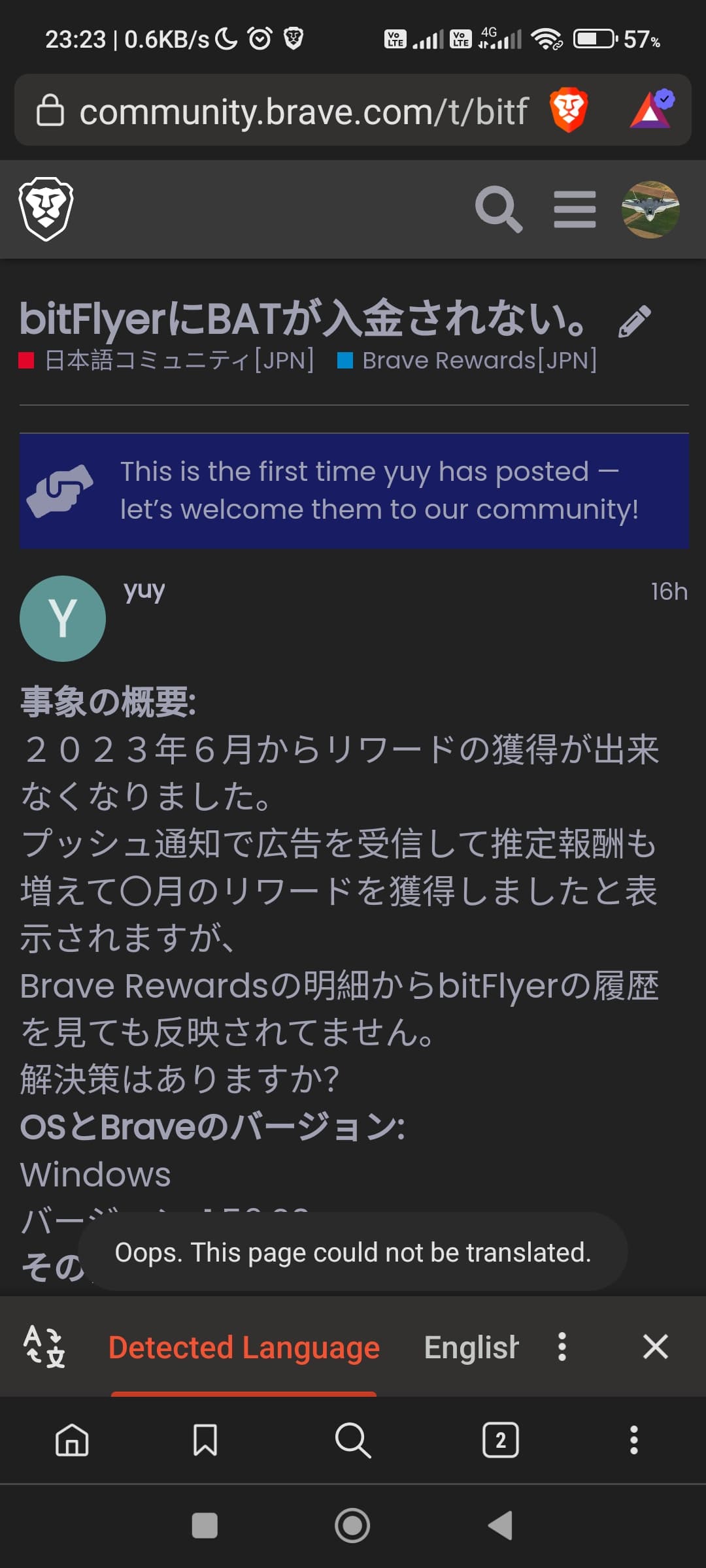
Description of the issue:
Brave translate never automatically detects the language. I always have to juggle between languages to translate it. Kinda it’s become more like manual translation. It does translate the page once I choose the appropriate language from which it needs to be translated into English.
How can this issue be reproduced?
- Go to any website displaying in a language other than the one you prefer. For examole
Sugerencia que puede beneficiar a todos
- Enable translate, it won’t detect the language and we need to select the language manually.
- Once I select the language, the page is translated perfectly. The problem lies with detection of the language being displayed.
Expected result:
It should auto detect the language and translate
Brave Version( check About Brave):
1.49.122
Mobile Device details
Running MIUI 14 based on Android 13. It’s a poco x3 pro
Additional Information:
I noticed that the issue doesn’t occur at a page which is totally in a different language. I face the problem on websites where the page has some part in English and the other in some another language (example → Brave community page when viewing posts in japanese, spanish) bitFlyerにBATが入金されない。
Attaching a few screenshots.
@SmartyAadi,
Sorry that nobody responded to your thread here.
Unfortunately on my end I cannot reproduce this. Using my Samsung Galaxy, I’m able to translate all the pages I tested with, including the Community thread you linked above — which was a bit surprising, considering the languages on that page are mixed. But as I continued scrolling down past English-language replies it continued translating the individual replies that were in Spanish.
What about other websites? For example, can you try going to https://konami.jp and/or just going to https://www.wikipedia.org/ and selecting a different language and then having the browser translate those pages?
All those pages you suggested work flawlessly on my device too.
I still see the error at the page I mentioned about here on community
I also tried on my Windows, same error or the translate Button fails to show up completely.
It must have something to do with Community specifically. I wonder if the issue for some reason has to do with dark mode? Can you try changing your Community theme to Default and then testing again?
Done. Still get the same error. I will try the same in my Nightly and revert back.
The issue happens in my Brave Nightly as well(not synced to any other Brave installation)
Gotcha — to confirm though, you’re only having this issue with community.brave.com right? Other sites are translating for you without issue?
Affirmative. Yeah, I will surely share info if I get an error on other pages
Just an update. I was just checking random settings on my Android and found that the ‘Experimental Night mode’ at Settings → Appearance was turned on. I turned it off and now translates doing a better job.
Good to know — thank you for the update.
hello @Mattches I have the same problem @smartyadi when I enter a foreign page that is not in my language it does not detect the language detected in Spanish and the translation expels it for me that is a mistake
Uploading: Screenrecording_20230817_145557.mp4…
I have the exact same issue. I live in Greece and want to auto translate to English. It never auto translates. This sote for example https://houseofspices.gr/eshop/ you have to manually set it to Greek. Would be nice if there was a setting to automatically set a default language to try when not auto detected.