Brave lags/freezes when the window loses focus

Description of the issue:

I use more than one monitor, and I usually keep the browser open on one while working on another. However, I’ve noticed that whenever the Brave window loses focus, it either freezes or becomes very laggy. For example, if I play a YouTube video and then switch to another program on a different screen, the video freezes visually and only the audio keeps playing. It seems to be a rendering issue, because as soon as I refocus the Brave window, the video resumes normally from where it should be.

How can this issue be reproduced?

  1. Unfocus the Brave window.

  2. Perform any action that makes the Brave window inactive.

Expected result:

Videos or other content should continue playing normally even when the window is not in focus.

Brave Version:

Brave 1.84.141

Additional Information:

None

I reported the same issue months ago and sadly got nothing.

You don’t by chance also have an AMD Radeon GPU? When I had a 1080 Ti I was new to Brave, and don’t recall having this, but then I went to a 7900 XT and this issue has been daily since.

https://community.brave.app/t/brave-ui-freezes-while-watching-youtube-videos-at-random-intervals/625327/6

I am glad I am not the only one with this issue. As yea I found moving the YouTube window unfreezes it, and it’s always when another window has focus. Eventually the videos audio stops as well and when I drag the window, every frame that failed to render, just floods in out of nowhere as if it was stuck in a queue and the audio comes back where it froze (when the audio stopped).

(The one user on that thread with the issue had an RTX, so surely we can’t be the only ones with this problem?)

Brave Browser for MacOS will freeze (not crash) while at YouTube (not signed in). The behavior is at random times after having watched videos for a while.

Usually occurs when I am not actively doing something with Brave-and-YouTube, for example, I open another application and work with that for a short time . . . and then return to Brave-and-YouTube. Though there are occasions when I have not wandered off.

When Brave Browser freezes ← I can still copy the YouTube URL address, then close the Brave Browser window, then open a new Brave Window and paste, and go, thus returning to the video.

Though sometimes, I just Exit/Quit Brave Browser; pause; start up Brave Browser, and paste, and go . . .

I’m on Windows 11 25H2 (26200.7171) and this is happening (and I’m signed in). It’s simple to unfreeze, drag the window containing YouTube.

This occurs when actively scrolling (or auto-scrolling) on web pages in other Brave windows. (I’ve not observed it when in other apps, only other Brave windows).

When this freeze happens, ALL Brave windows freeze, until again, the one specifically playing YouTube, is moved (as in drag the title bar, but nothing inside is clickable or interactable, as in hovering causes no animations).

HW Acceleration enabled?

Yep, and the issue will go away, but that is not going to cut it for a solution anymore. Months, MONTH of this now.

This is the one issue I have gone through and verifiably am sure there’s a bug within Brave that isn’t within Chromium.

But my time is valuable, and I already tried to offer it months ago when I reported this. Now someone else will need to further troubleshoot, but I want this triaged properly (in the definition of ordering in rank of importance, aka GPU side, let’s collect the make and model, look for common factors, etc).

Collect GPU information, and I do not want this ball dropped. I’ve specified my GPU already multiple times. Collect the data ASAP or you’ll never solve it.

Ohh hi! I’m using Windows 25H2 (26200.7171) and my GPU is an Nvidia 3060 Ti. I’ve been looking around the internet, Reddit, YouTube, etc. trying to find people with the same issue. Most of the suggestions I found were things like disabling hardware acceleration, changing some Brave flags, or tweaking settings in the Nvidia Control Panel related to background applications.
But honestly, none of that seems to work.

Same, nothing actually works here, and it’s always the YouTube window that seems to cause the freeze. We know it’s not crashing, we know it’s a freeze because it can be unfrozen.

But now seeing two Nvidia users and me being AMD, this issue is a bug without a doubt, and not even specific to a vendor of GPU. A race condition in the frame presentation? Because it seems some frame of video stalls everything, it gets hung up on ONE frame, and the audio will keep playing for a few seconds before it stops because AV sync has become too great (if video is stopped and audio is going). Then as mentioned, dragging YouTube causes that backflow of decoded frames to race out on-screen catching up to where the audio stopped, and then thus causing audio to resume as well.

Now the tally of affected users is up to 3, and the only extensions I use are:

  1. Return YouTube Dislikes
  2. Dark Reader (not used on YouTube, excluded on sites with native Dark Mode)
  3. YouTube Shorts Block

If either of us have one of those 3 extensions, I’d be willing to see if that’s the cause. Issue being I cannot nor have the time to test in a Private Window simply because of how random it is (it could take hours, or days). Dark Reader likely isn’t it, it simply isn’t running, but the other two YouTube specific ones are.

I have manually turned them off, and if I had to suspect one that could be causing it, it might be Return YouTube Dislikes (not YouTube Shorts Block, as that doesn’t prevent shorts from showing up, it just prevents the Shorts Player from being used on Shorts, and forces the regular “full” player on Shorts, so on regular videos it shouldn’t be engaging).

I suspect Return YouTube Dislikes could cause it because it actively causes modification on every single page. But again when disabled to test, I just can’t tell. With an issue so random I’d honestly have more fun eating a box of nails.

But perhaps if all effected share an extension, we can figure this one out.
I don’t think this is related to extensions I already test it, at least not in my case, because it happens whenever I unfocus the window. For me, the bug isn’t really random, every time the window loses focus, after a few seconds or minutes it becomes very laggy, then the video freezes while the audio keeps playing, and eventually the audio also starts lagging until it freezes too.

For me it’s also when YouTube doesn’t have focus, but it’s not predictable. It happens more so when a different Brave Window has focus, and it always seems to happen when I’m in the middle of scrolling. But because I use the wheel and use auto-scroll (middle click) I don’t know which one I’m doing when the freeze happens to document exactly what I was doing.

It’s such an odd one, but when YouTube is in the background I don’t get stutters like you, so that’s one difference with everything else seeming to line up (perhaps this is a difference in how the bug manifests between our two GPU’s).

I just feel it’s related, but I gave up troubleshooting it, beyond my control.

Ah ha!! I finally captured it on video. OBS would ironically un-freeze Brave the moment desktop capturing would start, so I used my phone to video tape the screen showing the behavior we are exhibiting.

I believe this is the same issue @Sunless has? In my case for the first time, it un-froze paused, when it normally doesn’t do this, most of the time it plays “frame catch up” as previously mentioned.

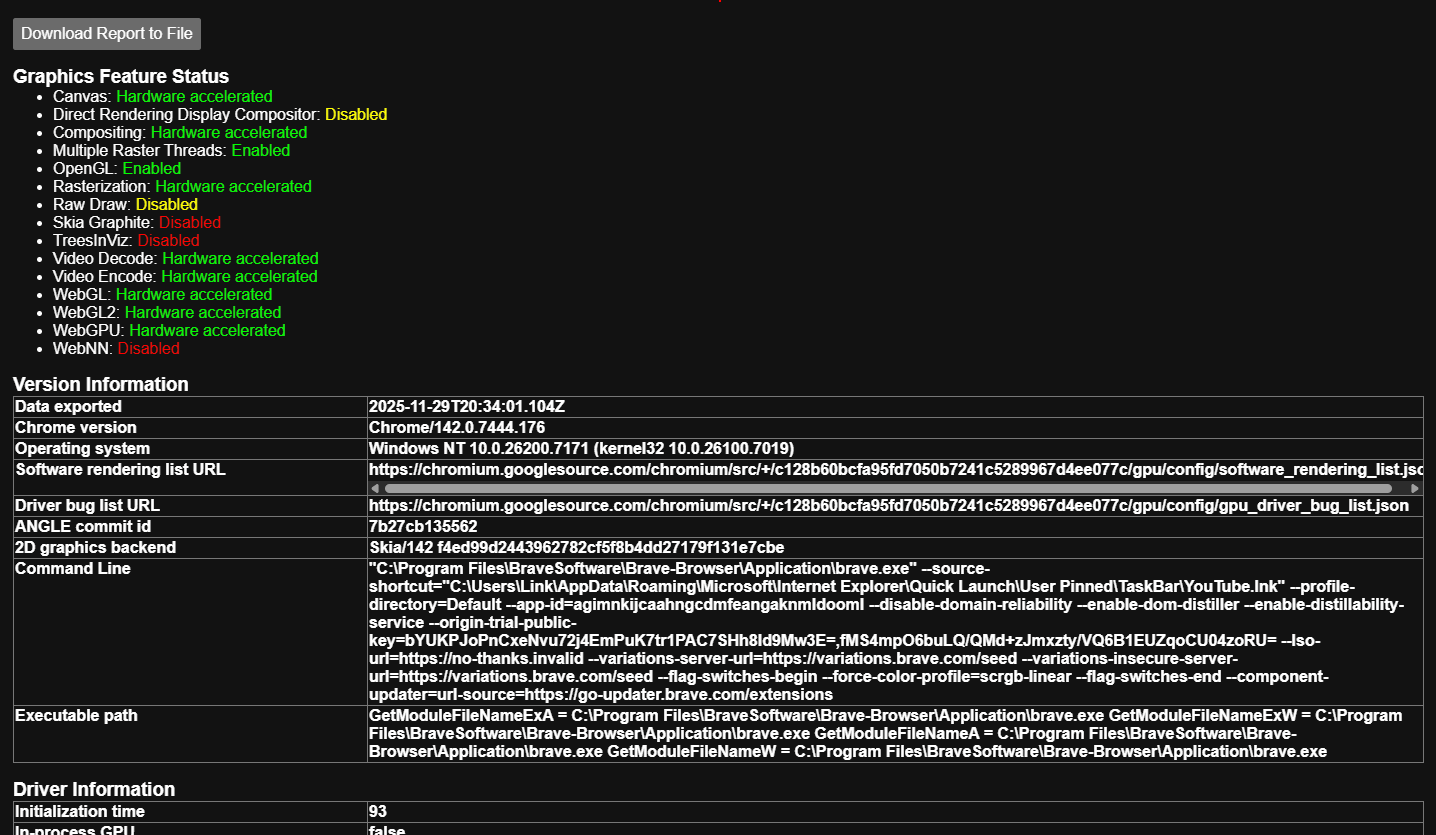
My Brave flags are currently all on defaults as we speak, and currently brave://gpu shows the following (Command line arguments show I was using the YouTube PWA as seen in the video, however this happens even if I don’t use the PWA, but the website directly within Brave as well):

I captured it again and found it does auto-pause when it’s frozen for so long that the audio simply stops, because it no longer has AV sync.

It appears if you click through the frozen UI, it IS clicking things, so it’s the visual side that freezes, but interacting with it still happens, you just can’t see (which could be dangerous if you start frantic-clicking on a frozen browser thinking nothing is happening, but underneath that frozen framebuffer you are causing chaos on a website).

I do hope with video evidence of this issue that AMD/Nvidia users are running into, perhaps now we can fix this?

Honestly my current steps to reproduce are: Play YouTube video in background at highest quality, 1080p or 4k, be HERE on this Brave Community in another Brave Window. Scroll around, type, just interact HERE while YouTube plays in the background. Eventually within the hour, it’ll freeze.

That’s how often this is starting to become for me at this point, and it’s beyond frustrating when evidence is given, suddenly no one responds.

@Mattches ? Again please RE: Brave UI freezes while watching YouTube videos at random intervals - #6

I do not want this issue burried and forgotten. People ARE running into this issue, NO we cannot provide logs because there are none, and they are apparently Nvidia users, but I’m AMD, so even GPU vendor has nothing to do with it. I have tried without extensions and no, it doesn’t help. In fact when I was trying to help another user with their HDR issue and put my Brave in software rendering mode (to match their issue), I was shocked, it froze without even playing a YouTube video in a similar way, without hardware acceleration. So clearly something’s up. (YouTube auto-launched when Brave relaunched turning off graphics accel because I clicked Relaunch when YouTube was already up.)

@MasterLink I’ve opened the following issue on our Github – apologies for not getting to this issue sooner:

These graphics related issues are often tough to track down given how different everyone’s setup/machine is. I’ve tagged one of our devs in the issue to try and get his eyes on it as he may have a good clue as to what’s causing it.

Thank you. I totally agree, it’s challenging to track down, especially when there’s no logs. That’s why I’m personally frustrated by it for the past several months I’ve been suffering this, I can’t even begin to try and troubleshoot it myself.

What I can tell you is I’ve tried new installs, no custom flags, but it’ll still happen. What I can also say at least based on previous reports, while I personally thought it was AMD exclusive, because when I had a GTX 1080 Ti, I had NONE of these freezes, it was only when I got an RX 7900 XT that it started. However, the Nvidia users complaining are not using GTX’s either, they are using RTX’s. So perhaps it’s something to do with more modern cards? It’s a complete guess to me. I’ve tried even using the DAWN backend, and that didn’t work. I’ve certainly tried all the flags I can use, but the one flag I had not ever tried changing (because it will break things more than it’ll fix), is changing ANGLE from D3D11 to D3D9.

(I commented on the GitHub issue, as well, but I’m truly not active on GitHub, just wanted to forward my observations and what I observed about other users to keep everyone in the loop. I provided to the best of my ability everything I possibly can.)

(Removed the post, I realized I had two extensions installed regarding YouTube that were hidden from me from the toolbar and thus forgot about them, but even after removing them it didn’t actually help, so it’s not related.)