Description of the issue:
Scrolling does not work when visiting Bing.com with Shields up.
This happens when the cookie banner blocking feature prevents the cookie notice modal from appearing. Scrolling is disabled until the user decides what cookies are allowed. However, since the user never completes the choose cookie step, the scrolling is never enabled.
Steps to Reproduce (add as many as necessary): 1. 2. 3.
First, be sure that you have Shields up and also the cookie banner blocking feature enabled (it should be by default).
Then visit Bing and search for something.
If you’ve successfully reproduced the issue, the page will not be scrollable. This is because the Cookie notice was hidden/removed, but the overflow style on the <html> element hasn’t been removed.
If you’re having trouble reproducing the issue, it may be because you have manually chosen cookie settings at bing.com earlier, and it wouldn’t show you the cookie modal anyways. You’ll have to delete the cookies for the page before you see the issue again.
I should also mention that I’m visiting Bing.com from Turkey. The cookie modal might be different depending on your location.
Actual Result (gifs and screenshots are welcome!):
Bing results without scrollbar:

As you can see, the html element has an inline style with overflow: hidden:

This inline style isn’t part of the original HTML document. You can right-click the html element and add a breakpoint for when the element attributes change:
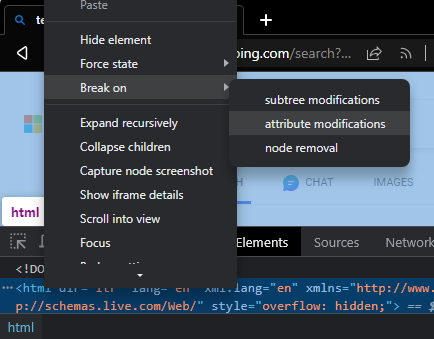
Reloading the page shows you the code where in the JavaScript code for the page that the inline style gets added:

The code is minified, so it’s hard to read. However, if you look around, you’ll see that it’s related to a variable named CookieBanner. To me, this indicates that the page scrolling is blocked by the JavaScript code when the page loads, but then the required code to remove the scroll blocking is never executed because the user is not given a chance to interact with the cookie modal.
Expected result:
Scrolling on the Bing.com results page works.
Reproduces how often:
Always, for me.
Operating System and Brave Version(See the About Brave page in the main menu):
Windows 11 Home
Brave Version 1.52.130 Chromium: 114.0.5735.198 (Official Build) (64-bit)
Additional Information:
If you search the forum for “not scrolling”, you might find a couple related issues. Because I’m a new user, I’m limited to only four URLs in this post.