Usually, in a Linux OS command line, you can start Brave Browser with one of the following commands:
brave -n --args --incognito --no-experiments --disable-extensions --disable-gpu --enable-leak-detection --crash-on-failure 2> $HOME/Desktop/brave_console_out.txt
or
brave-browser -n --args --incognito --no-experiments --disable-extensions --disable-gpu --enable-leak-detection --crash-on-failure 2> $HOME/Desktop/brave_console_out.txt
For that command string, the switches are intended to:
- Start up Brave Browser, showing a New Private Window [
--incognito] - Disable all experiments at
brave://flags[--no-experiments] - Disable extensions [
--disable-extensions] - Disable hardware (GPU) ie Graphic Acceleration [
--disable-gpu] - Enable leak detection and if that failure occurs, then crash the browser [
--enable-leak-detection --crash-on-failureare a combo] - Produce error/log output to a file named ‘brave_console_out.txt’ on the Desktop
How do I manually submit crash reports?
https://support.brave.com/hc/en-us/articles/22281484910221-How-do-I-manually-submit-crash-reports
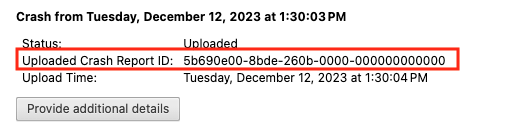
After you click the “Send Now” button, return to brave://crashes and gather up the Crash Report ID numbers that end with a string of zeros. Post the numbers, here, in a new reply. Example of a Crash Report ID number: