@MDB313 FYI, when you choose to ignore questions, it becomes difficult to help you. In the future, I hope you don’t leave things like the template blank.
All of the above is important.
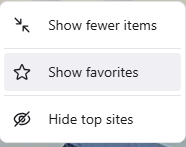
But you’re fortunate that I think I know what you’re talking about. In the newest update some of us saw the NTP revert to the default of Frequently Visited rather than Favorites (which used to be called Top Sites)
Frequently Visited shows what websites you visit the most. This is where it seems to be “created automatically.”
And yes, the top sites phrasing is there, but that’s just referencing the card/widget in whole. But the content displayed in it is just favorites or frequently visited.
@Saoiray appreciate your effort here.
Closing this topic as the user provided no information about the issue. If you want assistance, please repost to reflect the template and guidelines and we’d be more than happy to assist you.
Guidelines - Before posting, please:
Search the forum to see if anyone else has already posted or resolved the same issue you’re having.
Ensure that you’re posting in the appropriatecategory — please use the appropriate category when posting to ensure that whoever assist you has a clear idea of what product or platform you are using.
Fill out the template that appears in your editor when posting as it contains all the boiler-plate information surrounding your issue. It will help the Support team members and other Community members to efficiently assess and resolve your issue. NOTE: “Uncategorized” posts do not have a template, so please ensure you’re posting to the right category as mentioned above.
Tag your post appropriately – use tags to help track and organize threads on this forum.