@Nilodex you’re kind of working the opposite of what you need to do. Do not open as admin. When you do that, you contribute to the issue that’s breaking things.
So two different things going on. The primary is when Brave is launching as admin it’s shuffling components and other things into admin only folders. Then when you try to open and use Brave normally it’s not able to access those components. This is where you have to reassign those permission levels for all the folders to go back to the normal user account so things can be accessed and updated properly.
The secondary is in the recent Chromium updates they have set things to automatically try to lower permissions. Automatically de-elevate users launching chrome elevated. When you have something like that checkbox where it only launches with admin, it’s then going with the new code that tries to de-elevate back to the normal user account. The contradicting rules based on you checking that box is where it may automatically close.
Of course in either way, opening or attempting to open in admin would mess with the permissions levels on your OS. So it kind of goes full circle.
For those able to understand the step by step instructions that has been given by Clifton, everything resolves once you change the permissions to the appropriate account level. Then just having to make sure they aren’t trying to launch as admin on any level.
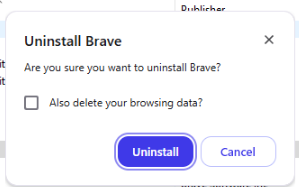
Those who have difficulty with this process are finding that completely uninstalling Brave, making sure to also erase browsing history, and then installing tends to resolve all of the issues.
For the latter, I’m referencing having to check this box that appears in the uninstall process for Windows: