Same issue here. I just reinstalled windows 11 and downloaded brave, every site it try to log in, as soon as i press sing in button the browser crashes (netflix, gmail, facebook etc) I tried to log in on a private window and that works like a charm. Version 1.77.100 Chromium: 135.0.7049.100 (Official Build) (64-bit)
It is still happening at this moment. I just downloaded Brave and attempted to sign in to google, but I am continuing to crash as I click on the “Email or Phone”. I do hope this gets fixed soon, I’ve quite liked a lot of things about Brave.
Still happenign to me too.
How do I manually submit crash reports?
https://support.brave.com/hc/en-us/articles/22281484910221-How-do-I-manually-submit-crash-reports
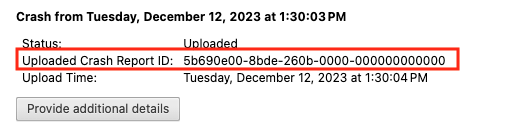
After you click the “Send Now” button, return to brave://crashes and gather up the Crash Report ID numbers that end with a string of zeros. Post the numbers, here, in a new reply. Example of a Crash Report ID number:
Same here happening with google, proton, chatgpt, yahoo, etc etc etc. After hitting enter in the password input box it crashes. I’m using a fresh install of Windows 11 and I’m a bit frustrated as I really want to use Brave on it but it’s impossible with this bug.
Even crashes with internal network services logins like my pi-hole
i’m having this same issue on version v 1.79.119. i’m using W11
Just so you know I’ve got this fixed by reinstalling Brave
Hey everyone!
I kept running into the same login issue across different services—no matter what I was trying to sign in to, it just wouldn’t work. After some trial and error, I found a temporary fix that worked for me. I’m currently using Windows 11 x64, and here’s what I did:
Steps:
- Uninstall your current Brave browser (the one where you’re facing the issue).
- Go to Brave’s official GitHub page and download the “standalone silent installer” for Brave v1.73.
- Disconnect from the internet. (Now this one is Crucial! If you’re online during installation, Brave will auto-update to the latest version, which brings back the same issue.)
- Run the installer and complete the installation.
- While still offline, launch the browser once.
- Reconnect to the internet, then sign in to your services (make sure to check “Keep me signed in”).
That’s it! You can stick with this version if it works fine for you, or feel free to update to the latest version—I’ve seen no issues either way.
Give it a shot and let me know if it works for you too!
Peace 
This topic was automatically closed 30 days after the last reply. New replies are no longer allowed.