So i play roblox a lot and i use the browser to joins games and allat. so when i close a roblox game (so far i didnt try it with any other games) my brave freezes and every time i click on it it tabs out i have to close it using task manager and re-open it to fix it.i do not know what caused this problem since it just started happening
Please edit your Original Post (“OP”) above, in order to include:
- Brave Browser version numbers
- Operating System version
How do I manually submit crash reports?
NOTE: In a Brave Browser New Window, go to: brave://settings/privacy and ENABLE Automatically send diagnostic reports
READ the guidance:
https://support.brave.com/hc/en-us/articles/22281484910221-How-do-I-manually-submit-crash-reports
After you click the “Send Now” button, return to brave://crashes and gather up the Crash Report ID numbers that end with a string of zeros. Post the numbers, here, in a new reply. Example of a Crash Report ID number:
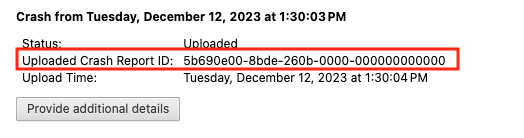
hey i checked the crash reports it says 0 but every time i close any game it freezes so i have to manually restart it so it might not show because of that
Was it after a windows update? I know after every big update, for some reason, every time I close a game the windows edge browser opens, and every time I have to find out how to disable that. Since it’s the exact opposite issue I have when closing a game, perhaps they’re related? Like your pc is trying to open edge but it’s not there so freezes brave.
Let me add that I have no computer skills or knowledge, and I have no idea what I’m talking about.
Are you using the Roblox + extension?
Is your extension MV3 compliant?
@TheChillGuy You are spot on about the crash reports. Since the browser is freezing and you have to force-close it through Task Manager, Brave doesn’t register it as a standard crash, which is why brave://crashes shows 0.
The symptom where Brave freezes after closing a game and immediately “tabs out” or loses focus when you click on it usually points to a conflict with your graphics driver, hardware acceleration, or a gaming overlay failing to hand focus back to the browser when exiting 3D mode.
Could you test a few things to help narrow this down?
- Test Graphics Acceleration: Go to
brave://settings/systemand toggle off Use graphics acceleration when available, then relaunch Brave. Open and close a game to see if Brave still freezes. (If that stops the freezing, the issue is likely tied to your GPU drivers or Windows display compositing). - Check Gaming Overlays & Boosters: Are you running any background gaming software or overlays such as Discord Overlay, NVIDIA App / GeForce Experience, AMD Adrenalin, Xbox Game Bar, or Razer Cortex/Synapse? Sometimes these tools hook into the browser’s rendering process or alter system states when a game launches and closes, leaving the browser window unresponsive.
- Extensions: Since you launch Roblox from the browser, do you have any Roblox-specific extensions installed (or any other extensions)? You can test this quickly by opening a Private Window (or creating a temporary second profile via the top-right menu), logging into Roblox there without extensions enabled, and seeing if it still freezes when you close the game.
Also, if you could still share your Brave version (found at brave://version) and your Windows version (Windows 10 or 11) as 289wk mentioned, that would be very helpful!